UI Recovery
The UI Recovery add-on protects users from losing unsaved changes in views. Users can spend a long time filling in a large form, and all their input is lost if the server node restarts or fails, the HTTP session expires, or the browser closes before they click OK.
The add-on saves the unsaved changes of a view to the database while the user works. This saved state is called a draft. When the user opens the same view again, the add-on offers to restore the draft. Drafts are kept in the main data store, so they are available in a cluster and after a full restart of the application.
You choose which views keep drafts by adding the drafts facet to their descriptors. No Java code is required.
Installation
|
This add-on requires the Enterprise subscription. If you don’t have the subscription, see the Enterprise Trial section for how to get a trial version. |
For automatic installation through Jmix Marketplace, follow instructions in the Add-ons section.
For manual installation, follow the steps below.
-
Configure access to the premium repository.
-
Add the premium repository to your
build.gradle:repositories { // ... maven { url = 'https://global.repo.jmix.io/repository/premium' credentials { username = rootProject['premiumRepoUser'] password = rootProject['premiumRepoPass'] } } } -
Add premium repository credentials to
~/.gradle/gradle.properties:premiumRepoUser=123456123456 premiumRepoPass=abcdefabcdefGet the repository credentials from your license key: the first part of the key before dash is the repository user name, the part after dash is the password. For example, if your key is
123456123456-abcdefabcdef, then the user name is123456123456and the password isabcdefabcdef.
-
-
Add dependencies to your
build.gradle:implementation 'io.jmix.uirecovery:jmix-uirecovery-flowui-starter'
The add-on adds the UIREC_VIEW_DRAFT table to the main data store.
How It Works
When a view with the drafts facet is opened and the user changes data in it, the facet saves the changes to the database. It does this regularly, but not more often than once in a configured interval. When the user saves the changes or closes the view and discards them, the facet deletes the draft.
If the work is interrupted, for example because the server was restarted, the draft stays in the database. When the user opens the view for the same record again, the facet finds the draft and shows a dialog that offers to restore it:
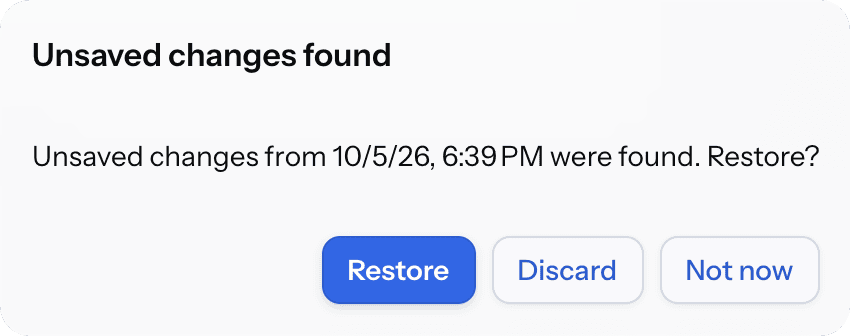
The user can restore the changes, discard them, or postpone the decision until the next time the view is opened. The view can also be configured to restore drafts without asking.
The add-on also provides the Unsaved drafts view that shows all drafts of the current user. It can be opened automatically after login.
Drafts
A draft belongs to a user, a view and an edited record:
-
Only the latest state is kept. Each save replaces the previous draft of the same user, view and record. There is no history of drafts.
-
A detail view of an existing record has a draft for each record. A detail view of a new record has one draft at a time.
-
A draft is visible only to the user who created it.
-
A draft contains only the attributes that the user changed. When the draft is restored, the attributes that the user did not change keep their current values, even if another user changed them after the draft was saved.
-
A draft expires after the retention period, which is 30 days by default. An expired draft is not offered to the user and is deleted. See Deleting Expired Drafts.
Limitations
The add-on saves only the changes that reached the server and were registered in the view’s DataContext. Keep in mind the following:
-
By default, a text field sends its value to the server when the field loses focus or the user presses Enter. A value that the user is still typing is not saved. You can send the value more often using the valueChangeMode attribute. See Saving Typed Values.
-
Values of components that are not bound to data are not saved.
-
A change of the order of elements in a collection is not saved if nothing else in the collection changed.
-
A change of an attribute of an embedded entity that is nested in another embedded entity is not saved.
-
The add-on does not merge changes made by different users. If the record was changed by another user after the draft was saved, the restore dialog warns about it. If the user restores the draft, the changed attributes are overwritten by the values from the draft. The same applies to the list of elements of a collection: restoring a draft replaces it.