Unsaved Drafts View
The Unsaved drafts view shows all drafts of the current user. It helps users find the work they did not save, for example after the application was restarted.
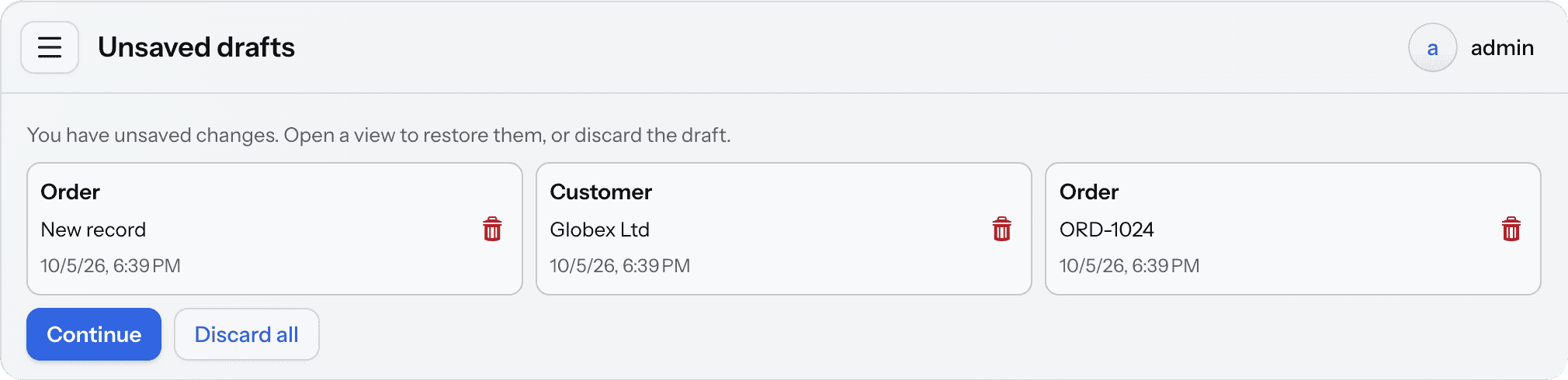
Each draft is shown as a card with the view title, the record and the date when the draft was saved. Clicking a card opens the view of the draft, and the drafts facet of that view offers to restore it. The view itself does not restore anything.
The trash button on a card deletes the draft, and the Discard all button deletes all drafts of the user. Both ask for confirmation. The Continue button opens the main view.
If the view of a draft no longer exists in the application, the card cannot be clicked, but the draft can be deleted.
Opening the View
The view has the uirec_DraftListView identifier and the uirec/drafts route. It is available to all authenticated users, so you don’t need to grant any roles for it.
The add-on doesn’t add the view to the main menu. To add it, include an item in the menu configuration:
<item view="uirec_DraftListView"
      title="msg://io.jmix.uirecoveryflowui.view.draft/DraftListView.title"/>
Showing Drafts After Login
The view can be opened automatically after login if the user has drafts. To enable this, set the jmix.uirecovery.drafts.show-on-login property:
jmix.uirecovery.drafts.show-on-login=trueThe view is shown once per session, instead of the main view. If the user logs in to open a particular URL, for example a link to a record, the application opens that URL and doesn’t show the drafts.