Using Data Components
This section provides practical examples of working with data components.
Declarative Usage
Usually, data components are defined and bound to visual components declaratively in the view XML descriptor. If you create a view for an entity using Studio, you can see the top-level <data> element which contains the data component declarations.
Below is an example of data components in a detail view for the User entity that has a to-one reference to Department and a to-many reference to the UserStep entity:
<data> (1)
    <instance id="userDc"
              class="com.company.onboarding.entity.User"> (2)
        <fetchPlan extends="_base"> (3)
            <property name="department" fetchPlan="_base"/>
            <property name="steps" fetchPlan="_base">
                <property name="step" fetchPlan="_base"/>
            </property>
        </fetchPlan>
        <loader/> (4)
        <collection id="stepsDc" property="steps"/> (5)
    </instance>
    <collection id="departmentsDc" class="com.company.onboarding.entity.Department"> (6)
        <fetchPlan extends="_base"/>
        <loader> (7)
            <query>
                <![CDATA[select e from Department e
                order by e.name asc]]>
            </query>
        </loader>
    </collection>
</data>| 1 | The root data element defines the DataContext instance. |
| 2 | InstanceContainer of the User entity. |
| 3 | The optional fetchPlan attribute defines the object graph that should be eagerly loaded from the database. |
| 4 | InstanceLoader that loads the User instance. |
| 5 | CollectionPropertyContainer for the nested UserStep entity. It is bound to the User.steps collection attribute. |
| 6 | A standalone CollectionContainer for the Department entity. It can be used as a source of dropdown items for selecting a department. |
| 7 | CollectionLoader that loads the Department entity instances using the specified query. |
The data containers defined above can be used in visual components as follows:
<textField id="usernameField" dataContainer="userDc" property="username"/> (1)
<formLayout id="form" dataContainer="userDc"> (2)
    <textField id="firstNameField" property="firstName"/>
    <textField id="lastNameField" property="lastName"/>
    <entityComboBox id="departmentField" property="department"
                    itemsContainer="departmentsDc"/> (3)
</formLayout>
<dataGrid id="stepsDataGrid" width="100%" minHeight="10em"
          dataContainer="stepsDc"> (4)
    <columns>
        <column property="step"/>
        <column property="dueDate"/>
        <column property="completedDate"/>
    </columns>
</dataGrid>| 1 | Standalone fields have dataContainer and property attributes. |
| 2 | The formLayout component propagates dataContainer to its fields, so they need only the property attribute. |
| 3 | The entityComboBox field has also the itemsContainer attribute to get the list of dropdown items. |
| 4 | dataGrid has only the dataContainer attribute. |
Programmatic Usage
Data components can be created and used in visual components programmatically.
In the example below, we create a detail view with the same data and visual components as defined in the previous section using only Java code without any XML descriptor.
@Route(value = "users2/:id", layout = MainView.class)
@ViewController("User.detail2")
public class UserDetailViewProgrammatic extends StandardDetailView<User> {

    @Autowired
    private DataComponents dataComponents; (1)
    @Autowired
    private UiComponents uiComponents;
    @Autowired
    private FetchPlans fetchPlans;
    @Autowired
    private Metadata metadata;

    private InstanceContainer<User> userDc;
    private InstanceLoader<User> userDl;
    private CollectionPropertyContainer<UserStep> stepsDc;
    private CollectionContainer<Department> departmentsDc;
    private CollectionLoader<Department> departmentsDl;

    @Subscribe
    public void onInit(InitEvent event) {
        createDataComponents();
        createUiComponents();
    }

    private void createDataComponents() {
        DataContext dataContext = dataComponents.createDataContext();
        getViewData().setDataContext(dataContext); (2)

        userDc = dataComponents.createInstanceContainer(User.class);

        userDl = dataComponents.createInstanceLoader();
        userDl.setContainer(userDc); (3)
        userDl.setDataContext(dataContext); (4)

        FetchPlan userFetchPlan = fetchPlans.builder(User.class)
                .addFetchPlan(FetchPlan.BASE)
                .add("department", FetchPlan.BASE)
                .add("steps", FetchPlan.BASE)
                .add("steps.step", FetchPlan.BASE)
                .build();
        userDl.setFetchPlan(userFetchPlan);

        stepsDc = dataComponents.createCollectionContainer(
                UserStep.class, userDc, "steps"); (5)

        departmentsDc = dataComponents.createCollectionContainer(Department.class);

        departmentsDl = dataComponents.createCollectionLoader();
        departmentsDl.setContainer(departmentsDc);
        departmentsDl.setDataContext(dataContext);
        departmentsDl.setQuery("select e from Department e"); (6)
        departmentsDl.setFetchPlan(FetchPlan.BASE);
    }

    private void createUiComponents() {
        TypedTextField<String> usernameField = uiComponents.create(TypedTextField.class);
        usernameField.setValueSource(new ContainerValueSource<>(userDc, "username")); (7)
        getContent().add(usernameField);

        FormLayout formLayout = uiComponents.create(FormLayout.class);
        getContent().add(formLayout);

        TypedTextField<String> firstNameField = uiComponents.create(TypedTextField.class);
        firstNameField.setValueSource(new ContainerValueSource<>(userDc, "firstName"));
        formLayout.add(firstNameField);

        TypedTextField<String> lastNameField = uiComponents.create(TypedTextField.class);
        lastNameField.setValueSource(new ContainerValueSource<>(userDc, "lastName"));
        formLayout.add(lastNameField);

        EntityComboBox<Department> departmentField = uiComponents.create(EntityComboBox.class);
        departmentField.setValueSource(new ContainerValueSource<>(userDc, "department"));
        departmentField.setItems(departmentsDc); (8)
        formLayout.add(departmentField);

        DataGrid<UserStep> dataGrid = uiComponents.create(DataGrid.class);
        dataGrid.addColumn(metadata.getClass(UserStep.class).getPropertyPath("step.name"));
        dataGrid.setItems(new ContainerDataGridItems<>(stepsDc)); (9)
        getContent().add(dataGrid);
        getContent().expand(dataGrid);

        Button okButton = uiComponents.create(Button.class);
        okButton.setText("OK");
        okButton.addClickListener(clickEvent -> closeWithSave());
        getContent().add(okButton);

        Button cancelButton = uiComponents.create(Button.class);
        cancelButton.setText("Cancel");
        cancelButton.addClickListener(clickEvent -> closeWithDiscard());
        getContent().add(cancelButton);
    }

    @Override
    protected InstanceContainer<User> getEditedEntityContainer() { (10)
        return userDc;
    }

    @Subscribe
    protected void onBeforeShow(BeforeShowEvent event) { (11)
        userDl.load();
        departmentsDl.load();
    }
}| 1 | DataComponents is a factory to create data components. |
| 2 | The DataContext instance is registered in the view for standard save action to work properly. |
| 3 | The userDl loader will load data to userDc container. |
| 4 | The userDl loader will merge loaded entities into the data context for change tracking. |
| 5 | The stepsDc is created as a property container. |
| 6 | A query is specified for the departmentsDl loader. |
| 7 | ContainerValueSource is used to bind single fields to containers. |
| 8 | CollectionContainer is directly used to provide items to combo boxes. |
| 9 | ContainerDataGridItems is used to bind DataGrids to containers. |
| 10 | getEditedEntityContainer() is overridden to specify the container instead of @EditedEntityContainer annotation. |
| 11 | Loads data before opening the view. The edited entity id will be set to userDl by the framework automatically. |
Dependencies Between Data Components
Sometimes you need to load and display data that depends on other data in the same view. For example, on the image below the left table displays the list of users (User entity) and the right one displays the list of onboarding steps (UserStep entity) for the selected user. The right list is refreshed each time the selected item in the left list changes.
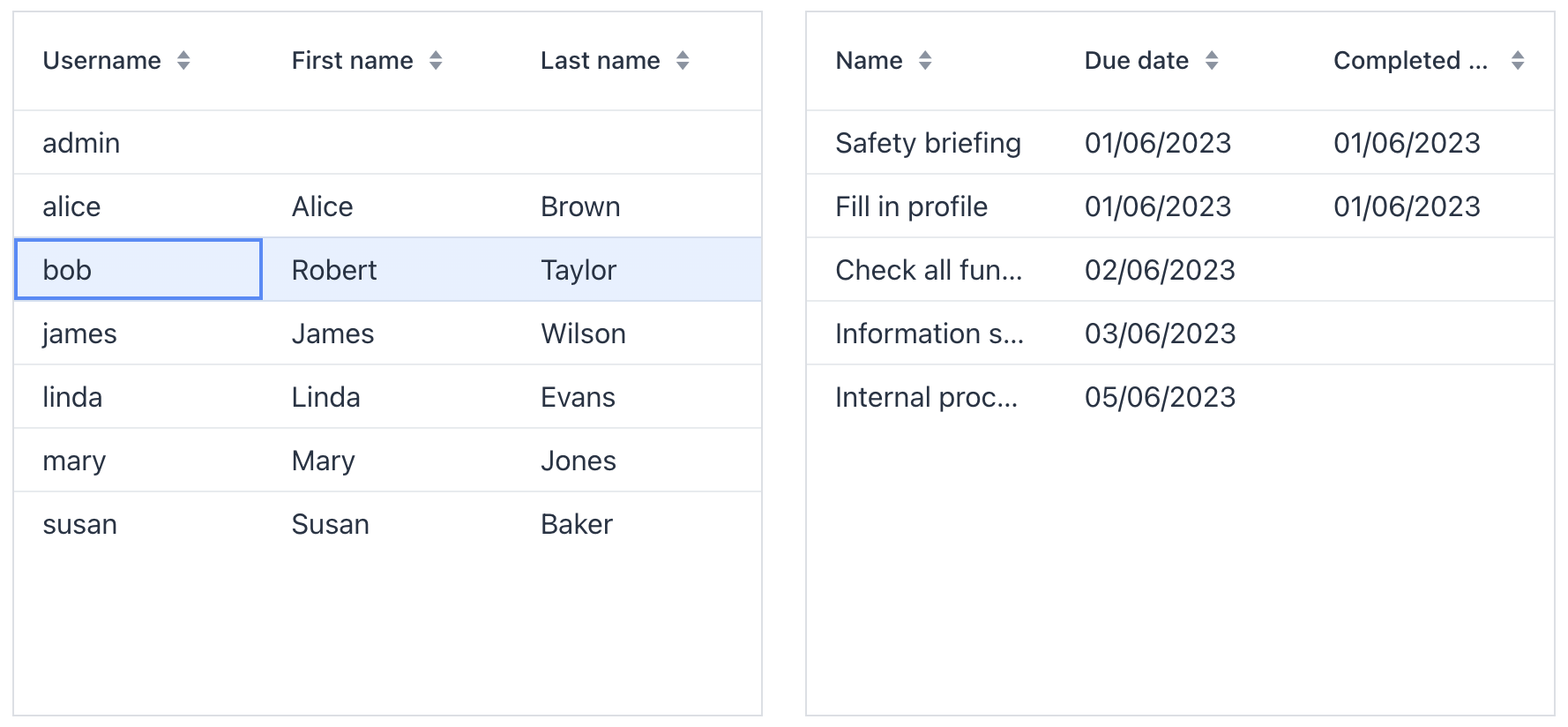
In this example, the User entity contains the steps attribute that is a one-to-many collection. So the simplest way to implement the view is to load the list of users with a fetch plan containing the steps attribute and use a property container to hold the list of dependent UserStep lines. Then bind the left table to the master container and the right table to the property container.
But this approach has the following performance implication: you will load UserStep instances for all users from the left table, even though you display the UserStep lines only for a single user at a time. This is why we recommend using property containers and deep fetch plans having collection attributes only when loading a single master item, for example, in the user detail view.
Also, the master entity may have no direct property pointing to the dependent entity. In this case, the above approach with a property container would not work at all.
The common approach to organize relations between data in a view is to use queries with parameters. The dependent loader contains a query with a parameter that links data to the master, and when the current item in the master container changes, you set the parameter and trigger the dependent loader.
Below is an example of the view which has two dependent container/loader pairs and the tables bound to them.
<view xmlns="http://jmix.io/schema/flowui/view"
      title="Users with onboarding steps"
      focusComponent="usersTable">
    <data readOnly="true">
        <collection id="usersDc"
                    class="com.company.onboarding.entity.User"> (1)
            <fetchPlan extends="_base"/>
            <loader id="usersDl">
                <query>
                    <![CDATA[select e from User e order by e.username asc]]>
                </query>
            </loader>
        </collection>
        <collection id="userStepsDc"
                    class="com.company.onboarding.entity.UserStep"> (2)
            <fetchPlan extends="_base"/>
            <loader id="userStepsDl">
                <query>
                    <![CDATA[select e from UserStep e where e.user = :user
                    order by e.sortValue asc]]>
                </query>
            </loader>
        </collection>
    </data>
    <facets/> (3)
    <layout>
        <formLayout>
            <dataGrid id="usersTable"
                      dataContainer="usersDc"> (4)
                <columns>
                    <column property="username"/>
                    <column property="firstName"/>
                    <column property="lastName"/>
                </columns>
            </dataGrid>
            <dataGrid id="userStepsTable"
                      dataContainer="userStepsDc"> (5)
                <columns>
                    <column property="step.name"/>
                    <column property="dueDate"/>
                    <column property="completedDate"/>
                </columns>
            </dataGrid>
        </formLayout>
    </layout>
</view>| 1 | Master container and loader. |
| 2 | Dependent container and loader. |
| 3 | The DataLoadCoordinator facet is not used, so we will trigger the loaders programmatically in the controller. |
| 4 | Master table. |
| 5 | Dependent table. |
@Route(value = "users-with-steps", layout = MainView.class)
@ViewController("UserWithStepsListView")
@ViewDescriptor("user-with-steps-list-view.xml")
@LookupComponent("usersTable")
@DialogMode(width = "50em", height = "37.5em")
public class UserWithStepsListView extends StandardListView<User> {

    @ViewComponent
    private CollectionLoader<User> usersDl;
    @ViewComponent
    private CollectionLoader<UserStep> userStepsDl;

    @Subscribe
    public void onBeforeShow(final BeforeShowEvent event) {
        usersDl.load(); (1)
    }

    @Subscribe(id = "usersDc", target = Target.DATA_CONTAINER)
    public void onUsersDcItemChange(final InstanceContainer.ItemChangeEvent<User> event) {
        userStepsDl.setParameter("user", event.getItem()); (2)
        userStepsDl.load();
    }
}| 1 | The master loader is triggered in the BeforeShowEvent handler. |
| 2 | In the ItemChangeEvent handler of the master container, a parameter is set to the dependent loader and it is triggered. |
| The DataLoadCoordinator facet allows you to link data components declaratively without writing any Java code. |
Sorting
UI components that are bound to a collection, such as dataGrid, use the sort order defined by the underlying CollectionContainer. Jmix handles both in-memory sorting and JPQL-based sorting using default behavior and provides extension points for customization.
Default Behavior
Sorting works as follows:
-
The visual component invokes the
Sorterassociated with the collection container. -
The framework obtains this sorter from
CollectionContainerSortManager. -
If no provider returns a sorter, the manager uses
SorterFactoryto create a standardCollectionContainerSorterorCollectionPropertyContainerSorter.
The standard sorter sorts data in memory when the container has no loader, or when only the first page is loaded and the number of loaded items is less than the page size. Otherwise, it reloads the data from the database with the requested sort. See Customizing JPQL Sort Expressions for details on JPQL sorting.
Custom In-Memory Sorting
Some entity attributes can require custom sorting logic. For example, the Department entity may have a num attribute of type String, while the stored values represent numbers. Sorting it as a string would produce 1, 10, 11, 2, 3, while sorting it numerically gives the more natural order: 1, 2, 3, 10, 11.
To customize in-memory sorting for this particular entity:
-
Create a subclass of
CollectionContainerSorter(alternatively, provide a completely customSorterimplementation):public class CustomCollectionContainerSorter extends CollectionContainerSorter { public CustomCollectionContainerSorter(CollectionContainer<?> container, BaseCollectionLoader loader, BeanFactory beanFactory) { super(container, loader, beanFactory); } @Override protected Comparator<?> createComparator(Sort.Order sortOrder, MetaClass metaClass) { MetaPropertyPath metaPropertyPath = Objects.requireNonNull( metaClass.getPropertyPath(sortOrder.getProperty())); if (metaPropertyPath.getMetaClass().getJavaClass().equals(Department.class) && "num".equals(metaPropertyPath.toPathString())) { boolean isAsc = sortOrder.getDirection() == Sort.Direction.ASC; return Comparator.comparing((Department e) -> e.getNum() == null ? null : Integer.valueOf(e.getNum()), new EntityValuesComparator<>(isAsc, metaClass, beanFactory)); } return super.createComparator(sortOrder, metaClass); } } -
Create a bean that implements
CollectionContainerSortProviderand returns the custom sorter only for supported containers:@Component @Order(100) public class CustomCollectionContainerSortProvider implements CollectionContainerSortProvider { @Autowired private BeanFactory beanFactory; @Nullable @Override public Sorter getSorter(CollectionContainerSortContext context) { if (supports(context)) { return new CustomCollectionContainerSorter(context.container(), context.loader(), beanFactory); } return null; } private boolean supports(CollectionContainerSortContext context) { return context.container().getEntityMetaClass().getJavaClass().equals(Department.class); } } -
Bind the container to a table component such as DataGrid. When the user sorts the table, the framework uses the sorter returned for the current container.
| This approach customizes in-memory sorting. If the container is backed by a loader and sorting should work when data is reloaded from the database, also configure JPQL sort expressions. |
Custom JPQL Sort Expressions
When a container is backed by a data loader, sorting is translated to JPQL. To customize the generated JPQL sort expressions, register a bean that implements JpqlSortExpressionSupplier.
Return a JPQL sort expression if the supplier supports the property, or null to let the next supplier handle it:
@Component
@Order(100)
public class CustomSortExpressionSupplier implements JpqlSortExpressionSupplier {

    @Override
    @Nullable
    public String getDatatypeSortExpression(SortExpressionContext context) {
        if (context.metaPropertyPath().getMetaClass().getJavaClass().equals(Department.class)
                && "num".equals(context.metaPropertyPath().toPathString())) {
            return String.format("CAST({E}.%s BIGINT)", context.metaPropertyPath());
        }
        return null;
    }
}
A supplier can implement the following methods:
-
getDatatypeSortExpression(SortExpressionContext context) -
getLobSortExpression(SortExpressionContext context)
ExpressionOrder
Use Sort.ExpressionOrder when sorting cannot be expressed as an entity attribute path and should be based on a JPQL expression instead.
Unlike regular Sort.Order, which sorts by an entity attribute such as name or customer.name, ExpressionOrder uses the given JPQL expression directly in ORDER BY. This is useful when sorting depends on a function, type conversion, or another custom expression.
For example, the JPQL expression can be:
-
function('calc_total_sum', {E}.id) -
length({E}.firstName) -
{E}.firstName
The following example sorts departments by the length of the name attribute:
<data readOnly="true">
    <collection id="departmentsDc"
                class="com.company.onboarding.entity.Department">
        <fetchPlan extends="_base"/>
        <loader id="departmentsDl">
            <query>
                <![CDATA[select e from Department e]]>
            </query>
        </loader>
    </collection>
</data>
<layout>
    <dataGrid id="departmentsDataGrid"
              width="100%"
              dataContainer="departmentsDc">
        <columns>
            <column property="name"/>
            <column property="num"/>
        </columns>
    </dataGrid>
</layout>
@ViewComponent
private CollectionLoader<Department> departmentsDl;
@Subscribe
public void onBeforeShow(final BeforeShowEvent event) {
departmentsDl.setSort(Sort.by(
Sort.ExpressionOrder.asc("length({E}.name)"), (1)
Sort.Order.asc("name")
));
departmentsDl.load(); (2)
}| 1 | Sort.ExpressionOrder.asc("length({E}.name)") adds the JPQL expression directly to sorting and uses the {E} alias of the root entity from the query. |
| 2 | After the sort is configured, the loader is executed explicitly. |
ExpressionOrder does not resolve MetaPropertyPath and bypasses JpqlSortExpressionSupplier and the framework default JpqlSortExpressionProvider. Therefore, you must provide a valid JPQL sort expression yourself.
|
When the query returns |
Multiple Sorting Providers
Jmix supports multiple sorting providers for both in-memory sorting and JPQL sort expressions and resolves them in Spring order:
-
For in-memory sorting, you can register multiple beans that implement
CollectionContainerSortProvider. If no provider returns a sorter, it falls back to the framework default –SorterFactory. -
For JPQL sort expressions, you can register multiple beans that implement
JpqlSortExpressionSupplier. If no supplier supports the property, it falls back to the framework default –JpqlSortExpressionProvider.
For example, an add-on can contribute one provider and the application can contribute another:
@Component
@Order(100)
public class AddonSortProvider implements CollectionContainerSortProvider {
    ...
}

@Component
@Order(200)
public class AppSortProvider implements CollectionContainerSortProvider {
    ...
}
In this example, AddonSortProvider is checked first because it has a lower order value.
| A bean with low precedence can act as an application-wide fallback while still allowing more specific beans to override it. |