aiCodeBlock
The aiCodeBlock component displays a fragment of source code with syntax highlighting, an optional language label, and actions for copying and wrapping the code.
XML Element |
|
|---|---|
Java Class |
|
Use it anywhere an application shows code. Inside a conversation it is also used automatically: aiMessageList renders every fenced code block of an assistant message as an aiCodeBlock, so code in a chat looks and behaves the same as code elsewhere in the application.
Basics
Declare the aichat namespace in the view’s XML descriptor:
<view xmlns="http://jmix.io/schema/flowui/view"
      xmlns:aichat="http://jmix.io/schema/aichat/ui"
title="msg://CodeBlockView.title">| Studio adds the namespace automatically when you add the component using the Add Component action in the top actions panel. See Component Palette. |
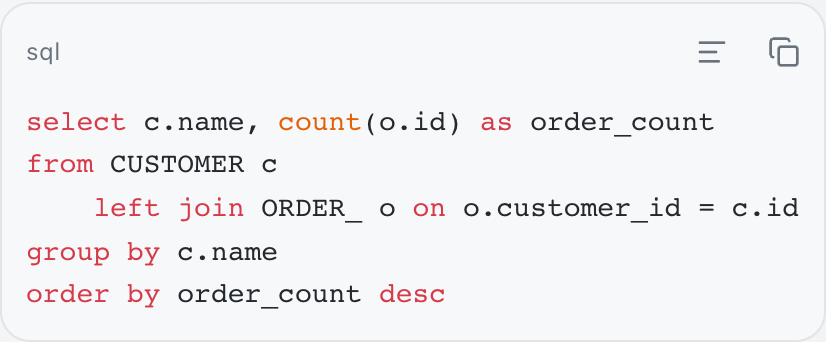
Then declare a block and put the source in a nested code element:
            <aichat:aiCodeBlock id="basicsBlock" language="sql">
                <aichat:code><![CDATA[select c.name, count(o.id) as order_count
from CUSTOMER c
    left join ORDER_ o on o.customer_id = c.id
group by c.name
order by order_count desc]]></aichat:code>
</aichat:aiCodeBlock>|
Write the nested element with the |
A block takes the width of its content and never exceeds the width of its container.
Code
There are two ways to provide the code.
A nested code element holds multi-line source. Wrap it in CDATA so that the source arrives verbatim, as in the example above.
The code attribute holds a single line and accepts a message key, which is useful when the source is kept in a message bundle:
<aichat:aiCodeBlock id="bundleBlock"
                    language="bash"
code="msg://runCommand.code"/>com.company.demo.view.codeblock/runCommand.code=./gradlew -Pvaadin.productionMode=true bootJarWhen both are present, the nested element wins. A code element that is present but empty fails the view load, so that it cannot silently shadow the code declared in the attribute.
Both may be omitted. The block then renders empty, which is the normal state of a block the controller fills later.
Language
The language attribute does two things: it puts a label in the block’s header, and it tells the highlighter which grammar to apply.
AiCodeBlockLanguage holds the common language ids as constants:
AiCodeBlock codeBlock = uiComponents.create(AiCodeBlock.class);
codeBlock.setLanguage(AiCodeBlockLanguage.JAVA);
codeBlock.setCode("""
        @Autowired
        private Notifications notifications;

        @Subscribe("saveButton")
        public void onSaveButtonClick(final ClickEvent<JmixButton> event) {
            notifications.show("Saved");
        }""");

programmaticBox.add(codeBlock);
The constants are a convenience, not the accepted set: the attribute takes any string. A value the highlighter does not recognize is not an error; the code renders as plain text.
Without a language, the block has no header row at all. The actions float over the top-trailing corner of the code instead, and the code is inset so that nothing renders underneath them:
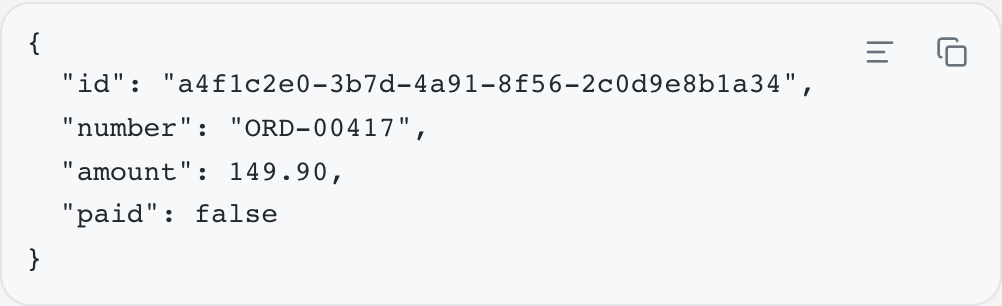
Highlighting requires a language, but the two settings are not interchangeable. Setting highlight="false" on a block that has a language keeps the header and the label and renders the code plain; omitting the language removes the header as well.
Copy and Wrap Actions
The copy action copies the source of the block to the clipboard, always the raw source and never the highlighted markup, and briefly confirms it.
The wrap action switches the block between horizontal scrolling and soft wrapping. Its icon and tooltip describe what the next click does rather than the current state. Replacing the code of a block resets wrapping to its declared value.
Either action can be removed with copyActionEnabled or wrapActionEnabled. A disabled action is not rendered at all:
            <aichat:aiCodeBlock id="actionsDisabledBlock"
                                language="properties"
                                copyActionEnabled="false"
                                wrapActionEnabled="false">
                <aichat:code><![CDATA[main.datasource.url=jdbc:postgresql://localhost:5432/demo
main.datasource.username=demo
jmix.core.available-locales=en,de]]></aichat:code>
</aichat:aiCodeBlock>|
The copy action fails silently when the browser refuses the clipboard write: nothing is copied, and nothing tells the user. The common cause is serving the application over plain HTTP, because browsers restrict clipboard access to secure contexts. Copying works over HTTPS and on |
Localization
The labels of the copy and wrap actions come from the add-on’s message bundle, under the aiCodeBlock.i18n.* keys: copy, copied, wrapOn, and wrapOff. Override these keys in the application’s message bundle to re-word the actions everywhere.
To re-word the actions of a single block, add a nested i18n element:
            <aichat:aiCodeBlock id="i18nBlock" language="yaml">
                <aichat:code><![CDATA[name: demo
services:
  db:
    image: postgres:17
    environment:
      POSTGRES_DB: demo
      POSTGRES_PASSWORD: demo]]></aichat:code>
                <aichat:i18n copy="msg://i18nBlock.copy"
                             copied="msg://i18nBlock.copied"/>
</aichat:aiCodeBlock>com.company.demo.view.codeblock/i18nBlock.copy=Copy the compose file
com.company.demo.view.codeblock/i18nBlock.copied=Compose file copiedIn the example above the wrap action keeps its standard labels. See Precedence for how the two levels combine.
Styling
The block exposes its internals as shadow parts, addressable with the ::part() selector.
The following style properties can be used in CSS stylesheets to customize the appearance of this component.
| Name | Description |
|---|---|
|
Background of the block. |
|
Corner radius of the block. |
|
Font family of the code. |
|
Font size of the code. |
|
Gap between the action buttons. |
|
Size of the action icons. |
|
Color of code that carries no syntax role. |
|
Color of language keywords. |
|
Color of string literals. |
|
Color of numeric literals. |
|
Color of comments. |
|
Color of declaration names, such as functions and classes. |
|
Color of type names. |
|
Color of built-in identifiers of the language. |
|
Color of attribute and property names. |
|
Color of markup tags. |
|
Color of metadata such as annotations and preprocessor directives. |
|
Color of the check mark that confirms a copy. |
|
Glyph of the copy action. |
|
Glyph shown while a copy is confirmed. |
|
Glyph of the wrap action while wrapping is off. |
|
Glyph of the wrap action while wrapping is on. |
The icon properties hold an image applied as a mask, so overriding one replaces that glyph.
The components are styled for both Jmix themes, Aura and Lumo, and follow the theme’s own tokens for focus rings, borders, radii, and spacing, which is why the properties above have no single default value. Dark mode, high-contrast mode, and reduced motion are handled, and layout is expressed in direction-agnostic properties, so the components follow the text direction of the document.
Attributes
The following attributes are specific to aiCodeBlock:
| Name | Description | Default |
|---|---|---|
Sets the code as a single-line value, directly or from a message bundle. A nested code element takes precedence. See Code. |
— |
|
Sets whether the code is soft-wrapped instead of scrolled horizontally. See Copy and Wrap Actions. |
|
|
Sets whether the block has a copy action. |
|
|
Sets whether syntax highlighting is applied. Highlighting also requires language to be set. |
|
|
Sets the language of the code, which is shown as a label and used for highlighting. Any string is accepted. See Language. |
— |
|
Sets whether the block has a wrap action. |
|
The following shared attributes are supported by aiCodeBlock:
Elements
code
The code element holds the source of the block. Its content is taken verbatim, so it can span several lines. See Code.
i18n
The i18n element re-words the actions of this block. It supports the copy, copied, wrapOn, and wrapOff attributes, each accepting a message key. Omitted attributes keep their values from the message bundle. See Localization.