Conditions and Gateways
Sequence flows connect the elements of a process. Conditions on sequence flows and gateways decide which path the process takes. In Jmix BPM, a condition can come from an expression, a user task outcome, or a business rule task result.
Sequence Flows
Sequence flow is a BPMN element that represents the order in which activities are performed within a business process. It defines the logical flow of work or information from one activity to another, indicating the sequence in which tasks or subprocesses should be executed.
Sequence flows connect two activities in a BPMN diagram, showing the direction in which the process flows and the dependencies between activities. They play a crucial role in visualizing and modeling the flow of work within a business process, helping to ensure clarity and consistency in process design.
Graphical and XML Representation
A sequence flow is visualized as an arrow going from the source element towards the target element. The arrow always points towards the target.
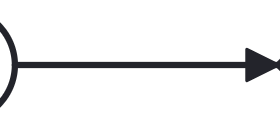
In the XML file sequence flows are represented as separate objects among other BPMN elements:
<sequenceFlow id="Flow_1sjggq6" sourceRef="Event_15w11z6" targetRef="Gateway_0r2ejfv" />You can see two XML attributes in the sequence flow description: sourceRef and targetRef that are referencing elements where the arrow begins and ends.
Incoming and Outgoing Flows
As a sequence flow connects two activities, for the first one it is outgoing and for the second one — incoming flow.
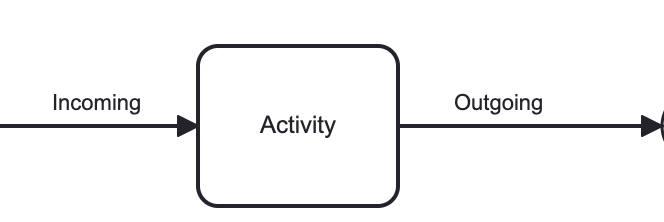
Best practice is to have the only one incoming and the only one outgoing flow for each activity.
In the XML file you can see references to sequence flows in the corresponding BPMN element description:
    <task id="Activity_1pncn0v" name="Activity">
      <incoming>Flow_1tncfsd</incoming>
      <outgoing>Flow_1nxsuoi</outgoing>
    </task>
Sequence Flow Properties
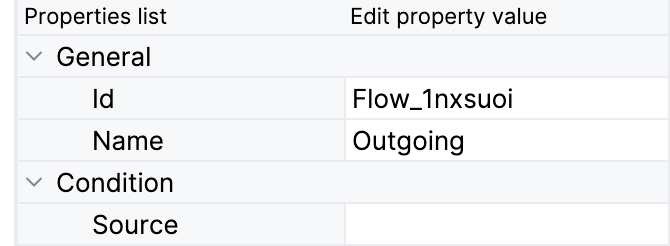
In the BPMN modeler, you can set the following properties of a sequence flow:
Property |
Description |
Id |
The identifier of the element. It is generated automatically, but you can change it to a more meaningful one to make logs easier to understand. |
Name |
The name of the element. |
Condition source |
The source of the condition: Expression, User task outcome, or Business rule task result. See Conditions. |
Condition expression |
The condition for the Expression source. See Expressions. |
User task id, User task outcome |
The user task and its outcome for the User task outcome source. See User Task Outcomes. |
Condition type |
The completion condition for a multi-instance user task. Available for the User task outcome source when the selected user task is multi-instance. See Multi-Instance. |
Business rule task, Decision table output variable name, Decision table output value |
The business rule task and its result for the Business rule task result source. See Business Rule Task Result. |
Execution listeners |
See Execution Listeners. |
Documentation |
A description and additional information about the element. |
Conditional Sequence Flow
BPMN 2.0 defines a conditional flow as a special element of notation. Graphically, it is represented as a regular sequence flow with a mini-diamond at the beginning of the connector line, see below:

Conditional flow can be used only as outgoing flow for activity. The condition must be evaluated at runtime to determine whether the sequence flow will be used or not.
In Jmix BPM all sequence flows may have a condition, but it will be evaluated and used only when required.

|
It is highly not recommended to use conditional flows because of the risk of errors. For example, in the picture above, the process will stop if the condition is false and no other paths are available. |
Default Sequence Flow
All BPMN 2.0 tasks and gateways can have a default sequence flow. This sequence flow is only selected as the outgoing sequence flow for activity or gateway.
A default sequence flow is visualized as a regular sequence flow, with a 'slash' marker at the beginning.

Default flow’s behavior depends on the element it is used with. Conditions on a default sequence flow are always ignored.
Using Conditional and Default Sequence Flows
Though BPMN specification allows using conditional and default flows as in the picture below, avoid using them such way. It makes the diagram worse readable and ambiguous.
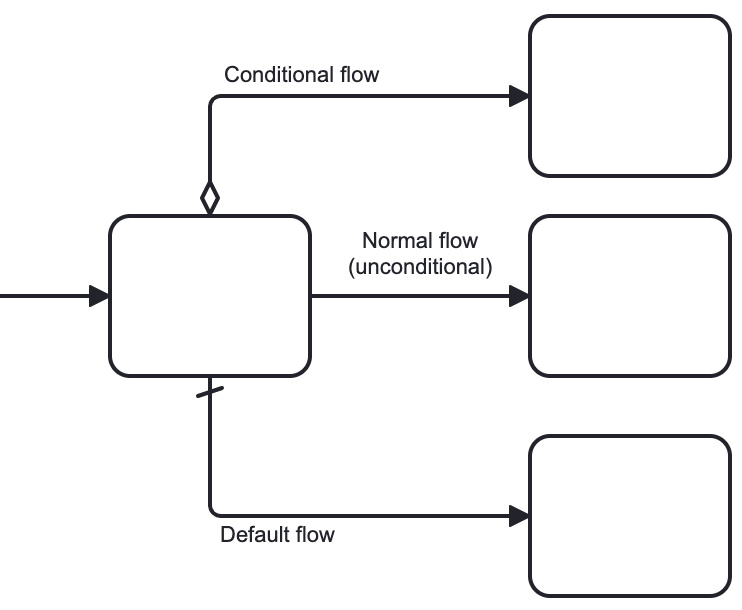
Instead of conditional and default flows, outgoing from the activity, better use gateway:
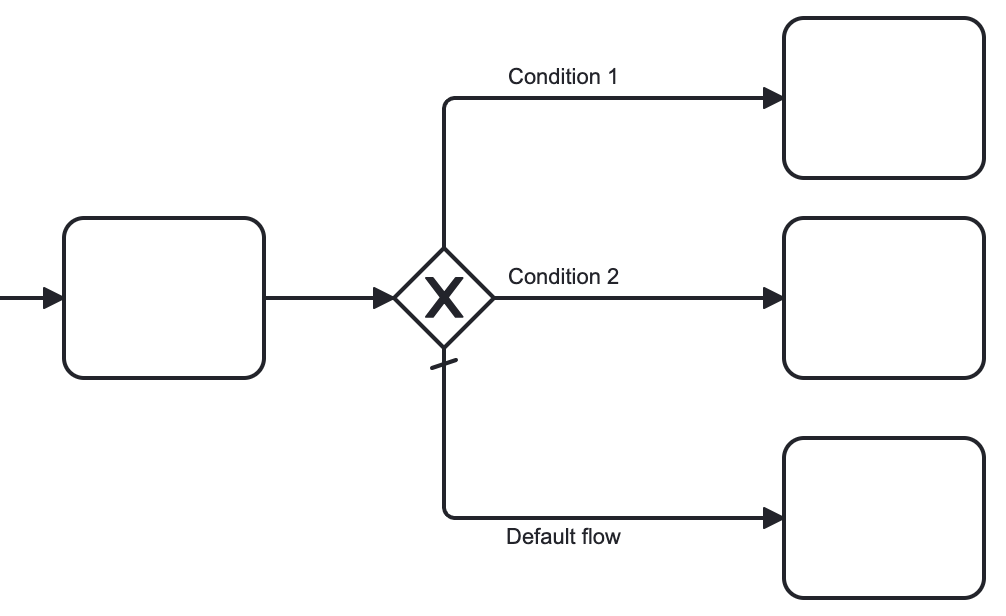
In this example, you can see an exclusive gateway, parallel and inclusive gateways are also possible.
Conditions
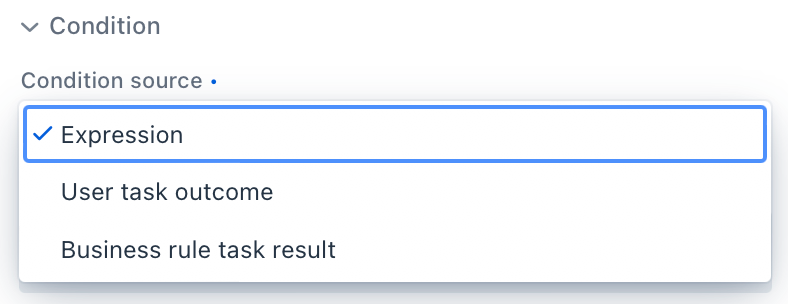
A condition defines when a flow is taken. In Jmix BPM, condition can be set from the following sources:
-
Expression
-
User task outcomes
-
Business rule task result
|
In an exclusive gateway, check that every outgoing flow except the default one has a condition. The gateway treats an empty condition as true and takes the first flow, in XML order, whose condition is true or empty. A text label over an arrow means nothing to the engine. |
Expressions
It is a boolean expression that can access the process variables and compare them with literals or other variables. As well, it’s possible to call Spring bean methods here.
For example:
${orderAmount > 1000}
${price > 100 && price <= 500}
${accountant.username == "jane"}
${jbt_MyService.getRandom > 0.5}
${jbt_MyService.evaluateCondition()}
In the last case, method must return boolean value.
User Task Outcomes
If there is in the process a user task with outcomes, you can select a certain outcome that activates the given flow.
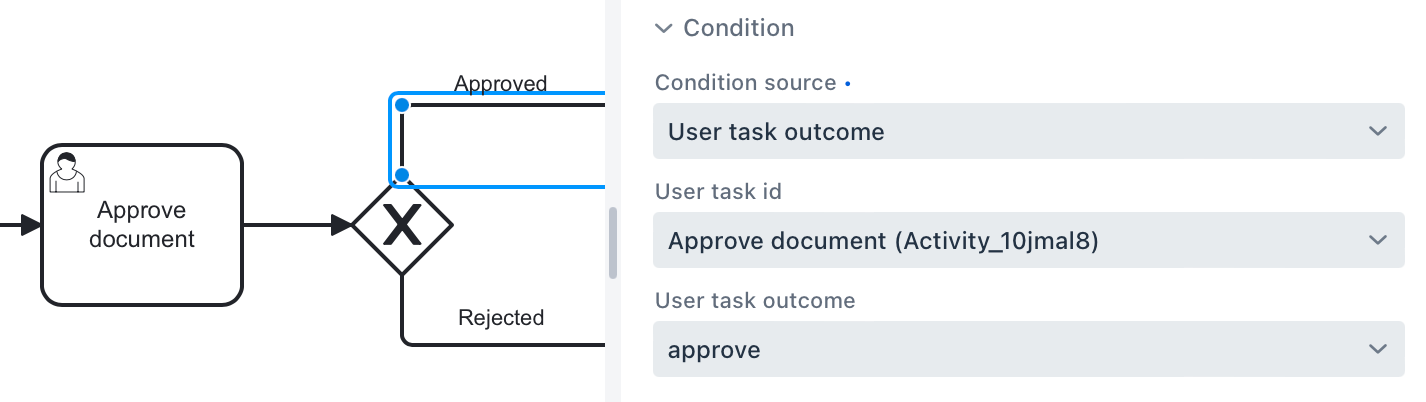
To set up outcome-based condition, select a user task, then outcome.
When selecting a user task for condition, be sure that it is to be executed BEFORE the condition is evaluated. Otherwise, it causes an error at runtime.
Conditions and Multi-instance user task
When a user task is multi-instance, an additional parameter appears — condition type:
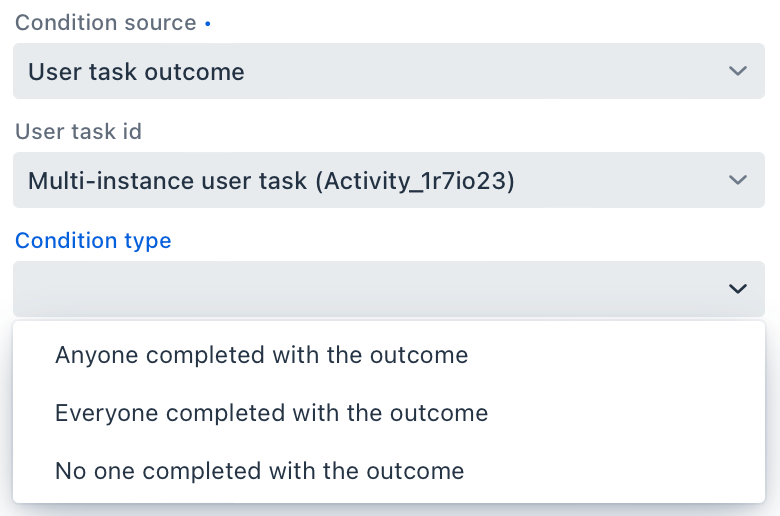
There are the following options:
-
Anyone completed with the outcome
-
Everyone completed with the outcome
-
No one completed with the outcome
Using this parameter, you can arrange some kind of voting. For example, this flow will be selected when at least one user has completed the task with the outcome 'yes'.
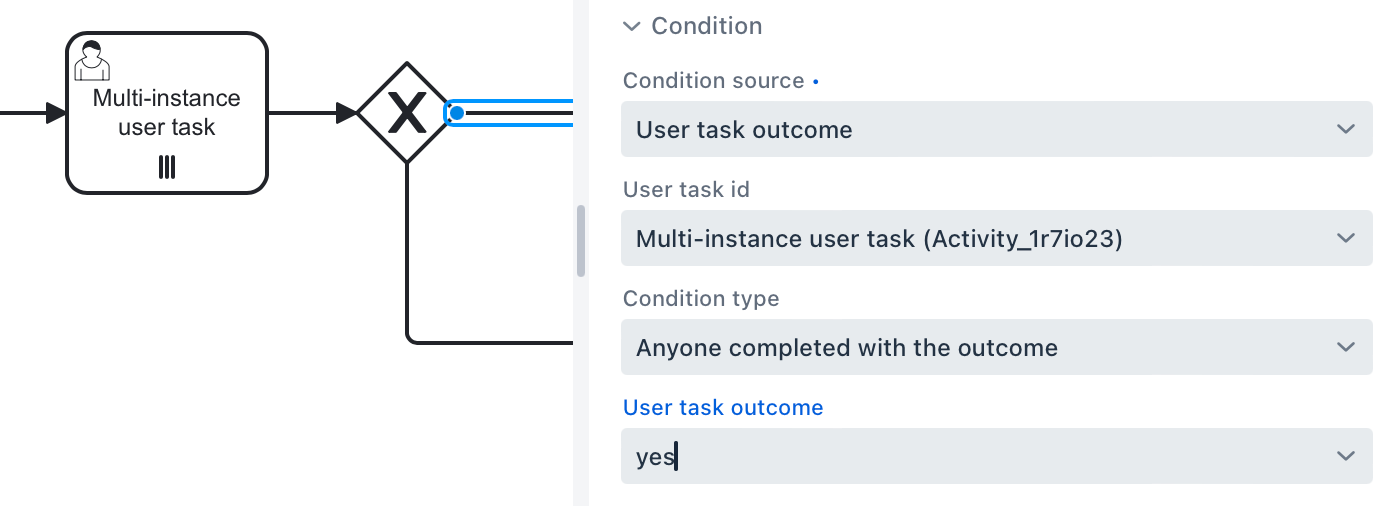
Business Rule Task Result
A business rule task returns a result that can be used in gateway’s condition.
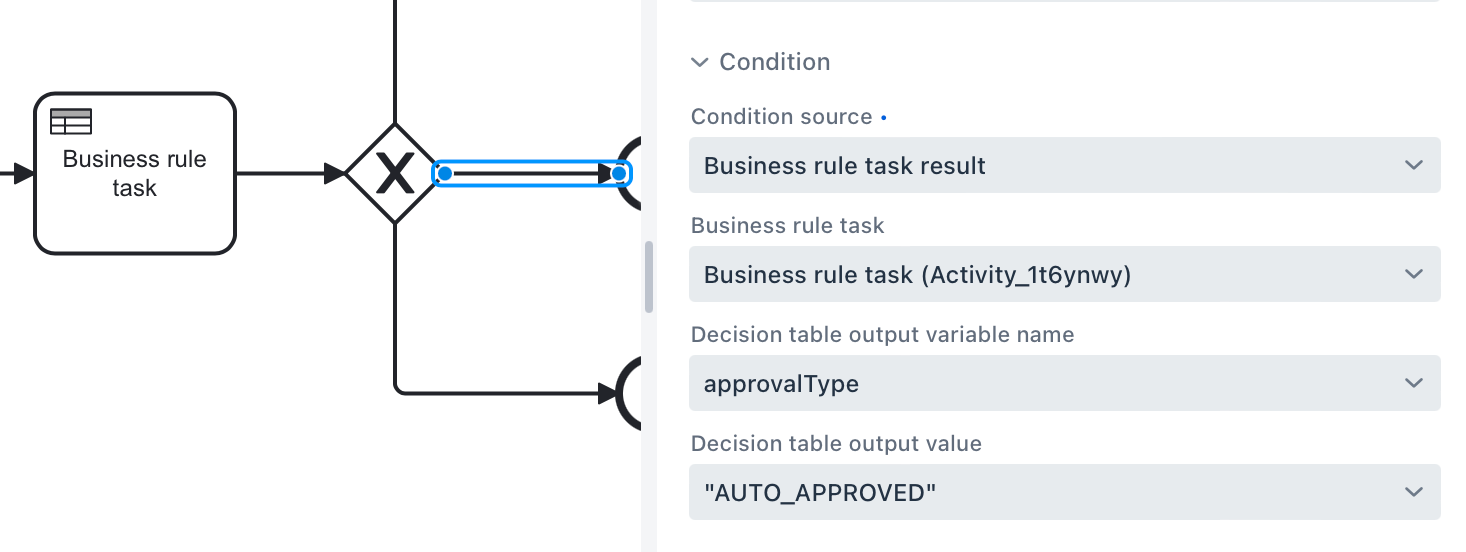
To set up a condition, based on the business rule result, select a business rule task, decision table output variable, and output value.
Be sure that selected business rule task is executed BEFORE the gateway.
Gateways
Gateways are used to control the flow of a process by determining under what conditions a process should proceed along different paths. Each type of gateway serves a specific purpose in directing the flow of a process based on certain conditions or events.
Gateways help to model decision points, branching, merging, and synchronization within a process, allowing for more complex and dynamic process flows to be represented accurately.
Gateway Types
There are four types of BPMN gateways supported in Jmix BPM:
-
Exclusive gateway
-
Parallel gateway
-
Inclusive gateway
-
Event-based gateway
A Complex gateway isn’t supported.
Graphical Representation of Gateways
All gateways are visualized as diamond shapes with different icons inside:

Fork and Join Gateways
All gateways except Event-based can be used in the process model in two roles:
-
Fork — where the process splits in several paths
-
Join — where paths merge
As a rule, fork and join gateways are paired, but it isn’t mandatory. If the process was split once, each path can continue until the End event.
|
Gateways are used to control the flow of the process execution by generating or consuming tokens. |
Gateway Properties
In the BPMN modeler, you can set the following properties of a gateway:
Property |
Description |
Id |
The identifier of the element. It is generated automatically, but you can change it to a more meaningful one to make logs easier to understand. |
Name |
The name of the element. |
Asynchronous execution |
Since Jmix 3.1 |
Documentation |
A description and additional information about the element. |
Exclusive Gateway
An exclusive gateway (or XOR-gateway) is used to model a decision in the process based on data, for example, on process variables values or values returned by bean method.
When the execution arrives at this gateway, all conditions associated with outgoing sequence flows are evaluated in the order in which sequence flows are defined.
The first sequence flow whose condition evaluates to true to be selected for continuing the process. Empty condition is considered as always true.
The term "first" in this context refers to the order in which sequence flows are defined in the XML file body, not necessarily the order in which they appear in the gateway description.
This distinction emphasizes that the sequencing of flows is based on the XML file structure rather than the visual representation or textual description of the flows within the gateway.
People often use questions as a name of exclusive gateway. For example, "Is the document approved?" But the gateway itself doesn’t have any internal logic. To make a gateway really work, conditions must be defined on the outgoing flows. See Conditions.
Default Flow
If there is one of outgoing flows marked as default (by the slash line across), it’d be selected only when all other flow conditions are false.
If the default flow has a condition, it’d be ignored.
It is highly recommended to use a default flow when modeling an exclusive gateway. However, it isn’t mandatory.
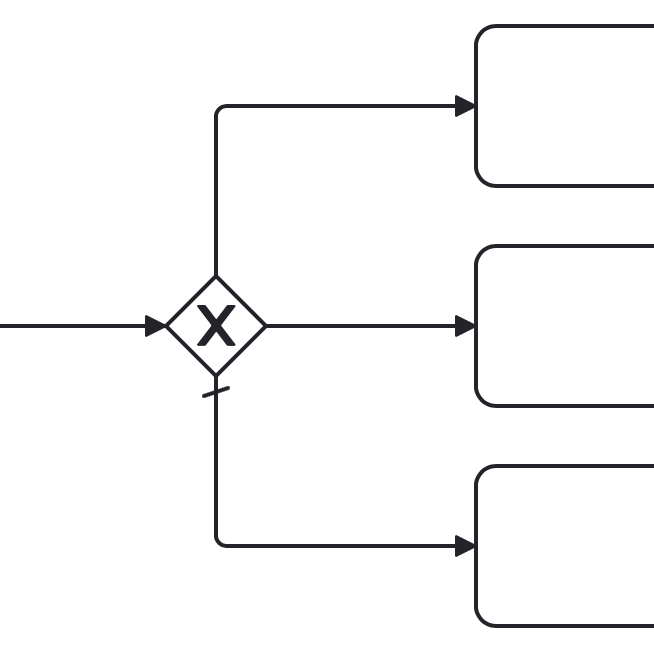
Using Exclusive Gateway
Separate Forks and Joins
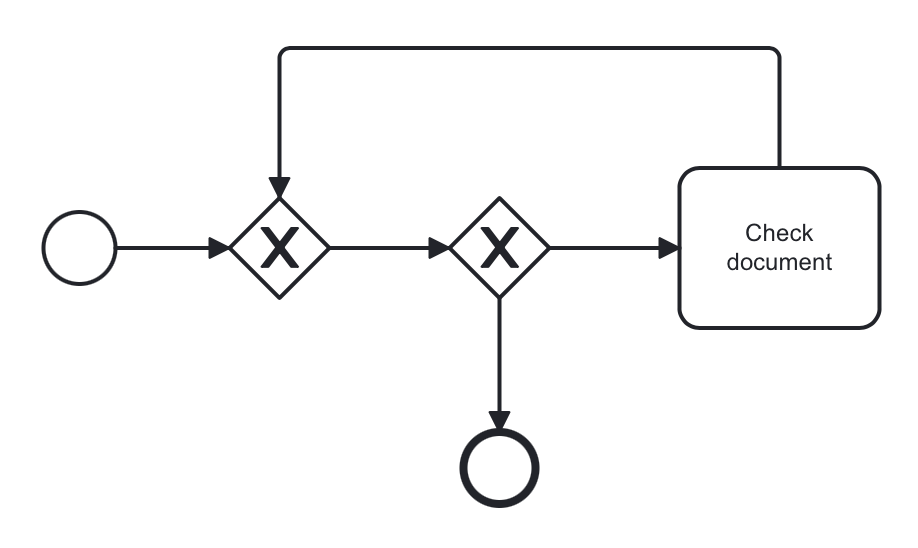
Formally, the BPMN specification allows you to use one gateway in two roles, but this usage is not recommended.
So, avoid using an exclusive gateway as shown in the picture, where the gateway is fork and join at once:
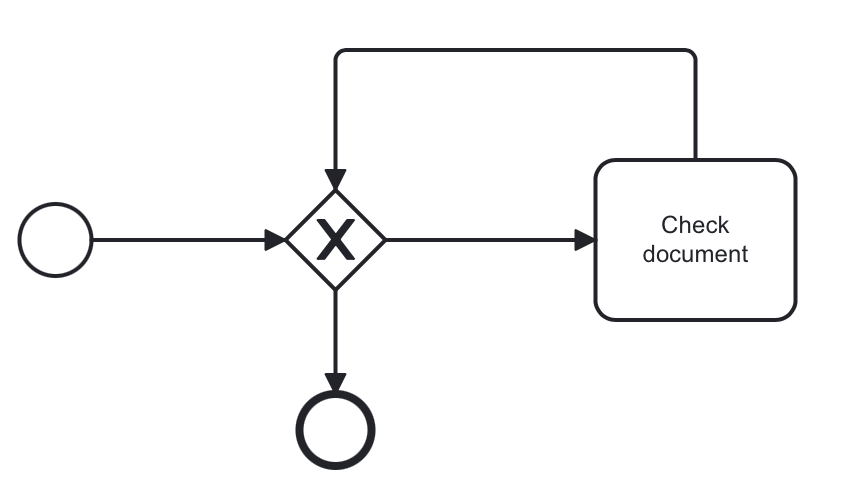
Better to separate gateway’s roles like shown in the next picture with two gateways, one for join and the other for fork:
Multiple True Conditions
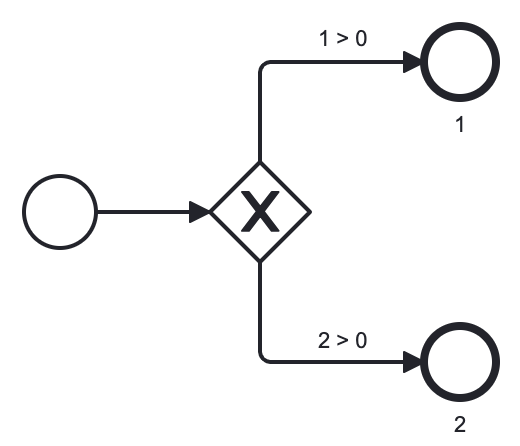
In this example, you can see exclusive gateway with two obvious conditions that both are true. Condition #1 will be evaluated first because it appears in the process XML file higher than condition #2. However, in the gateway description condition #2 stays first.
<process id="exclusion-gateway-demo" name="exclusion-gateway-demo" isExecutable="true">
<exclusiveGateway id="Gateway_0r2ejfv"> (3)
<incoming>Flow_1sjggq6</incoming>
<outgoing>Flow_2</outgoing>
<outgoing>Flow_1</outgoing>
</exclusiveGateway>
<endEvent id="Event_0kn6j1t" name="1">
<incoming>Flow_1</incoming>
</endEvent>
<sequenceFlow id="Flow_1" name="1 > 0" sourceRef="Gateway_0r2ejfv" targetRef="Event_0kn6j1t"> (2)
<extensionElements>
<jmix:conditionDetails conditionSource="expression" />
</extensionElements>
<conditionExpression xsi:type="tFormalExpression">${1>0}</conditionExpression>
</sequenceFlow>
<endEvent id="Event_1wmb937" name="2">
<incoming>Flow_2</incoming>
</endEvent>
<sequenceFlow id="Flow_2" name="2 > 0" sourceRef="Gateway_0r2ejfv" targetRef="Event_1wmb937"> (1)
<extensionElements>
<jmix:conditionDetails conditionSource="expression" />
</extensionElements>
<conditionExpression xsi:type="tFormalExpression">${2>0}</conditionExpression>
</sequenceFlow>
<startEvent id="Event_15w11z6">
<outgoing>Flow_1sjggq6</outgoing>
</startEvent>
<sequenceFlow id="Flow_1sjggq6" sourceRef="Event_15w11z6" targetRef="Gateway_0r2ejfv" />
</process>| 1 | — Sequence flow with condition #1 |
| 2 | — Sequence flow with condition #2 |
| 3 | — Gateway description section, flow with #2 before #1 |
Cascades of Exclusive Gateways
Exclusive gateway works like a 'SWITCH' operator in programming, not like 'IF'. It may have as many outgoing flows as you need.
It means you shouldn’t build cascades of YES-NO gateways, you can use more smart conditions to select right outbound sequence flow.
So, don’t model like this:
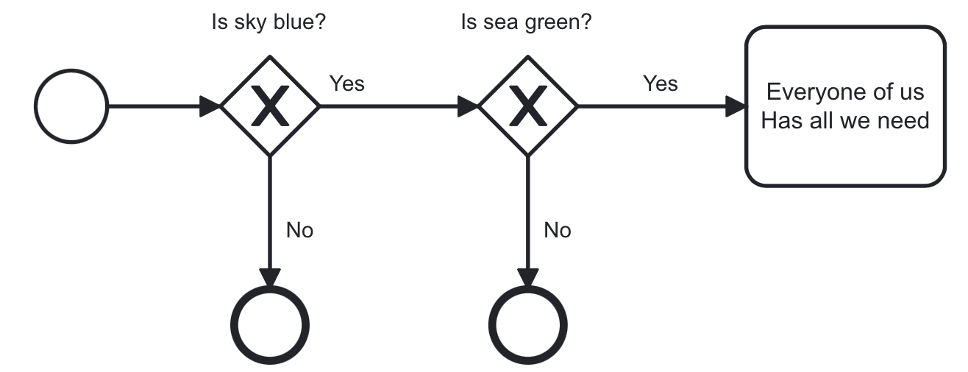
Here we see to gateways for evaluating atomic conditions Sky == blue and Sea == green. If both of them are true, the process goes further. But the model looks complicated.
When we use more advanced conditions, we can avoid cascades of gateways:
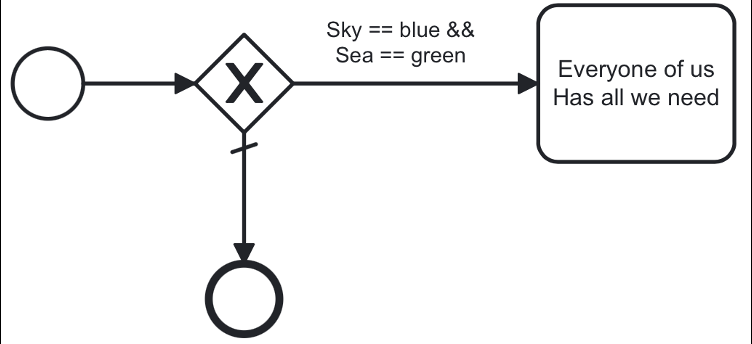
In this picture, we use a combined condition Sky == blue && Sea == green, thus there is only one gateway that is necessary.
Parallel Gateway
A parallel gateway (or AND-gateway) is used to split a process flow into multiple parallel paths or to merge multiple parallel paths back into a single flow.
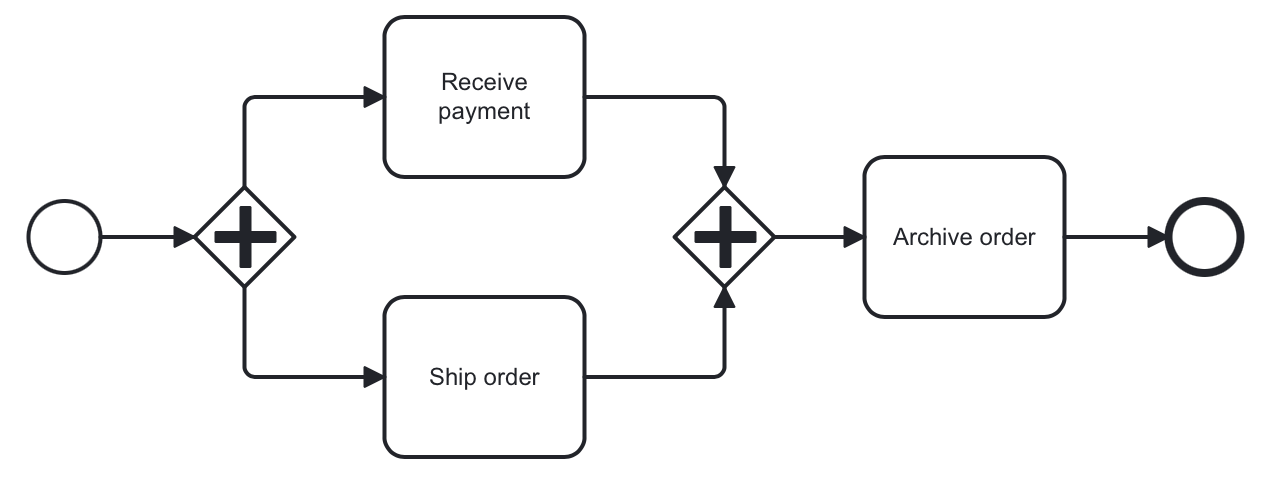
When execution arrives in the parallel gateway, the process splits in the number of paths equals the number of outgoing flows.
If there is a join parallel gateway, the process waits until all incoming flows be executed. In other words, until all parallel paths will reach the join gateway. Then the process continues past the joining gateway.
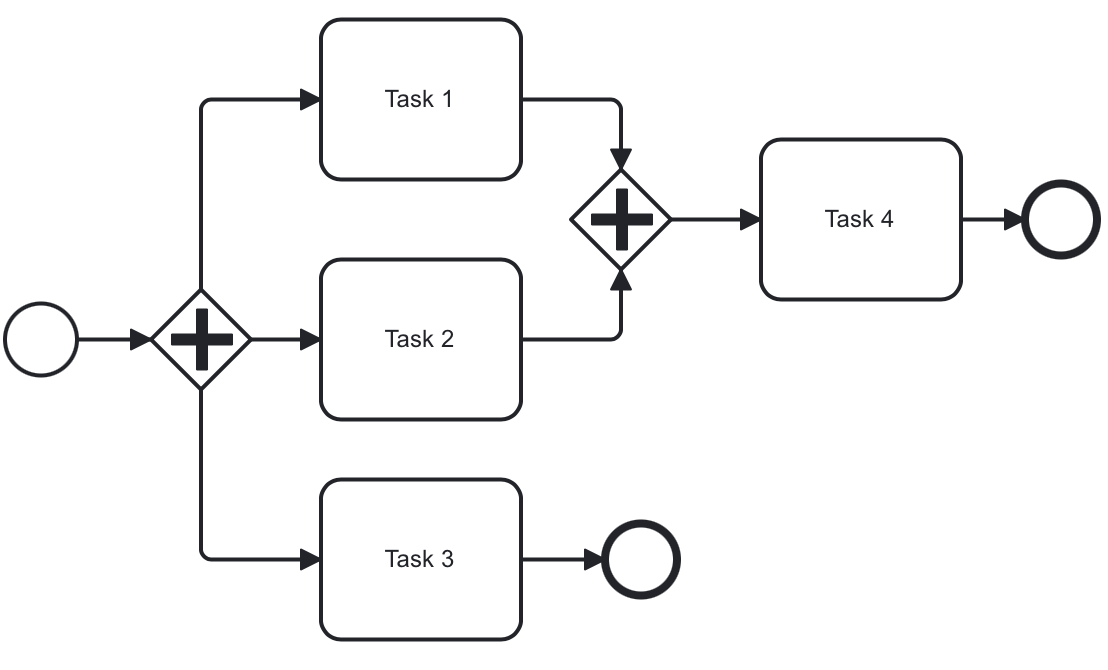
Actually, it isn’t mandatory to join parallel paths all together. Each of them may have its own End event. But the whole process ends only after ALL parallel path be finished.
Using Parallel Gateway
Separate Forks and Joins
Do not use the same parallel gateway as fork and join:
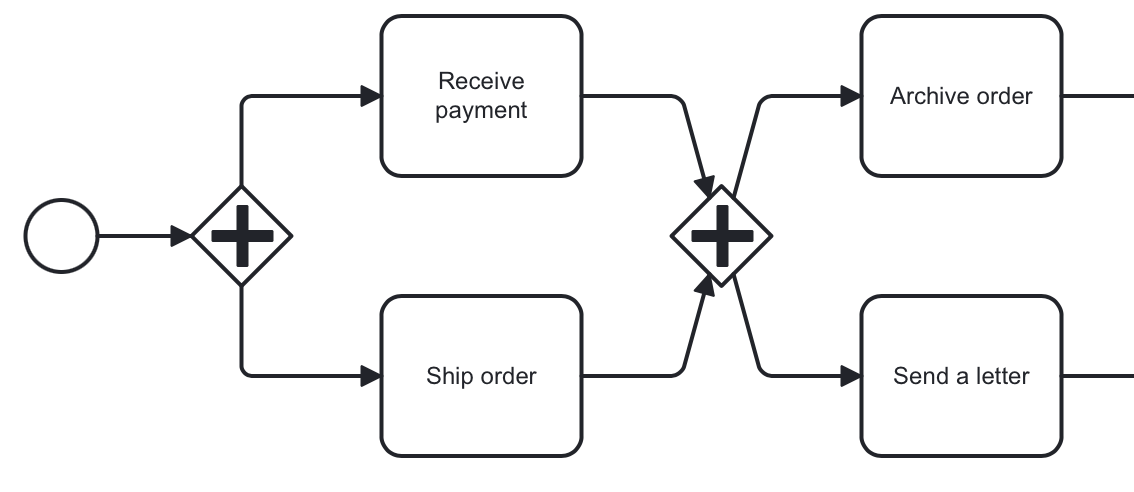
Formally it is possible but highly not recommended.
Use Cascades
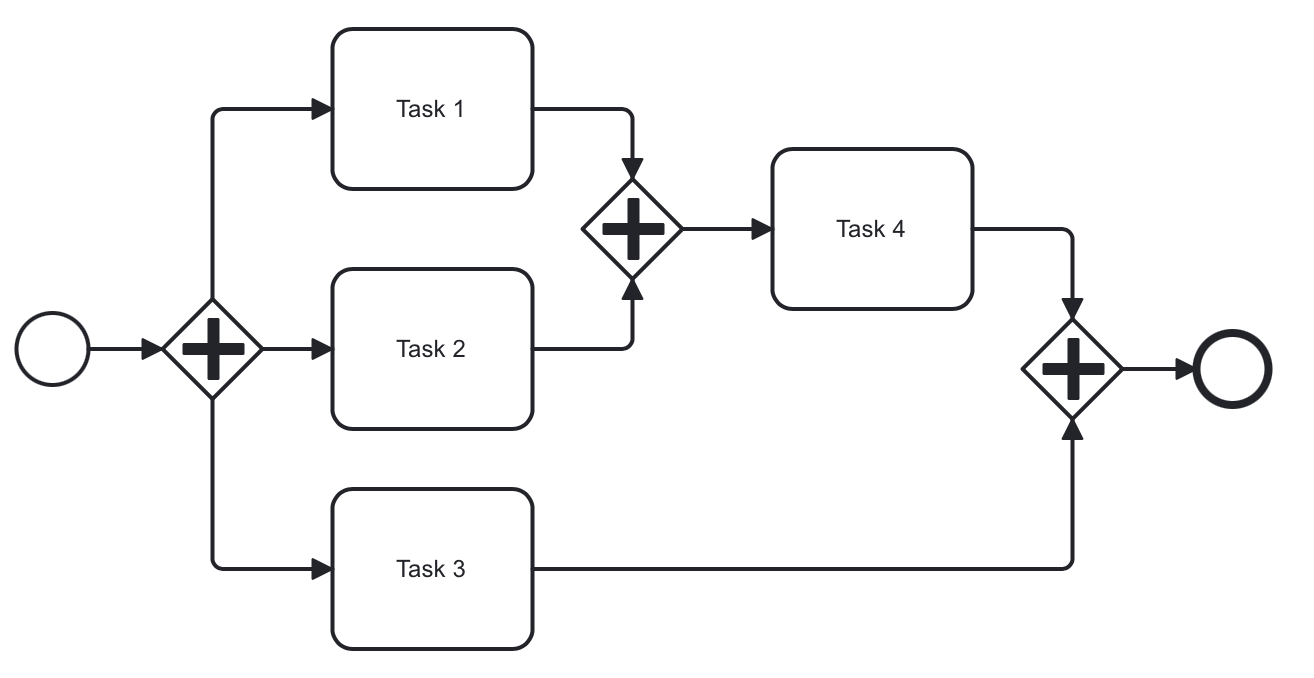
Note that a parallel gateway does not need to be 'balanced' (a matching number of incoming/outgoing sequence flows for corresponding parallel gateways).
A parallel gateway will simply wait for all incoming sequence flows and create a concurrent path of execution for each outgoing sequence flow, not influenced by other constructs in the process model. So, the following process is legal in BPMN 2.0:
And this model is valid as well:
Inclusive Gateway
The inclusive gateway (or OR-gateway) can be seen as a combination of an Exclusive and a Parallel gateway.
Like an exclusive gateway, you can define conditions on outgoing sequence flows and the inclusive gateway will evaluate them.
But the main difference is that the inclusive gateway can take more than one sequence flow, like the parallel gateway.
This differs from the parallel gateway as it only waits for incoming flows that will be executed (whose conditions were evaluated true). After the join, the process continues past the inclusive gateway.
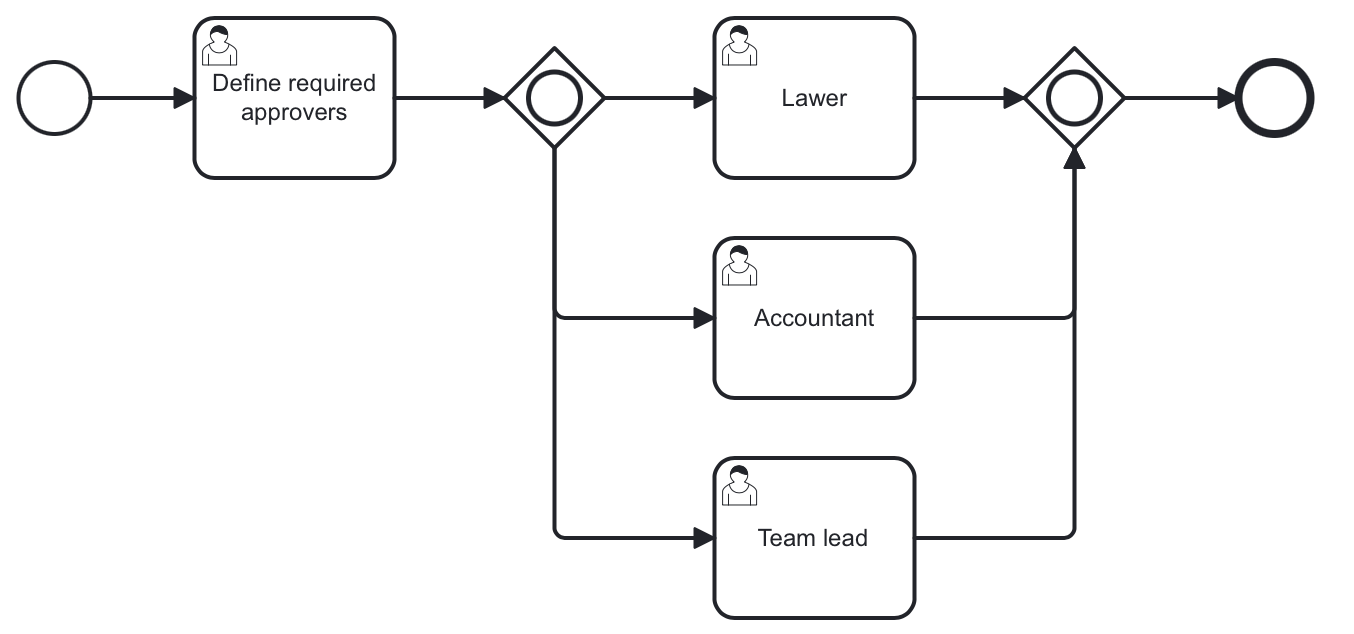
In this example, the first user fills a checklist, where marks who must participate in the approval process. It differs from the parallel process as only selected employees will receive the approval task.
Suppose, it were an Accountant and a Team leader selected. Then join gateway will wait until both of them complete the task.
Event-based Gateway
The event-based gateway provides a way to take a decision based on events.
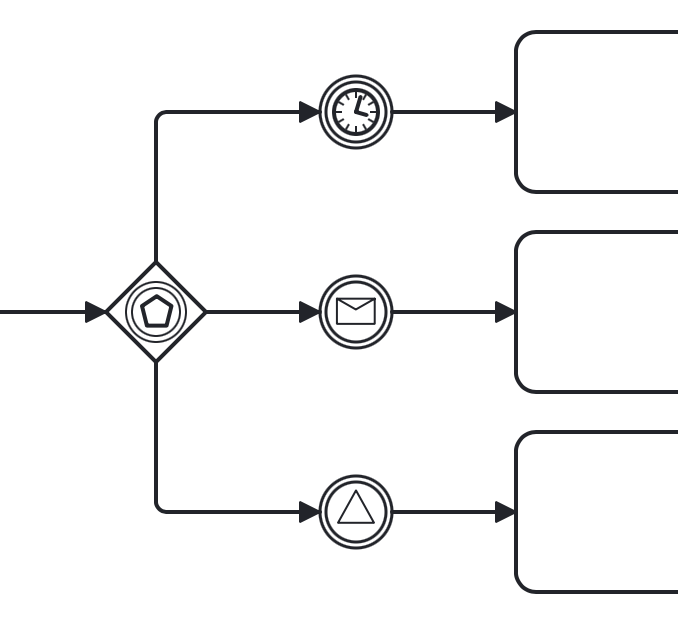
An event-based gateway must have at least two outgoing sequence flows. Each sequence flow must be connected to an intermediate catch event of type timer, message or signal.
No other activities are allowed right after event-based gateway.
When process execution reaches an event-based gateway, the gateway acts like a wait state: execution is suspended.
In addition, for each outgoing sequence flow, an event subscription is created.
Which event would be triggered first, that path the process will flow.
Note the sequence flows running out of an Event-based Gateway are different from ordinary sequence flows. These sequence flows are never actually "executed". On the contrary, they allow the process engine to determine which events and execution arriving at an Event-based Gateway needs to subscribe to.
Using Event-based Gateway
A typical case where using of event-based gateway is a request to unreliable external service. That service can fall down or return an error any time the process sends a request.
With an event-based gateway, you can model it like shown in the picture:
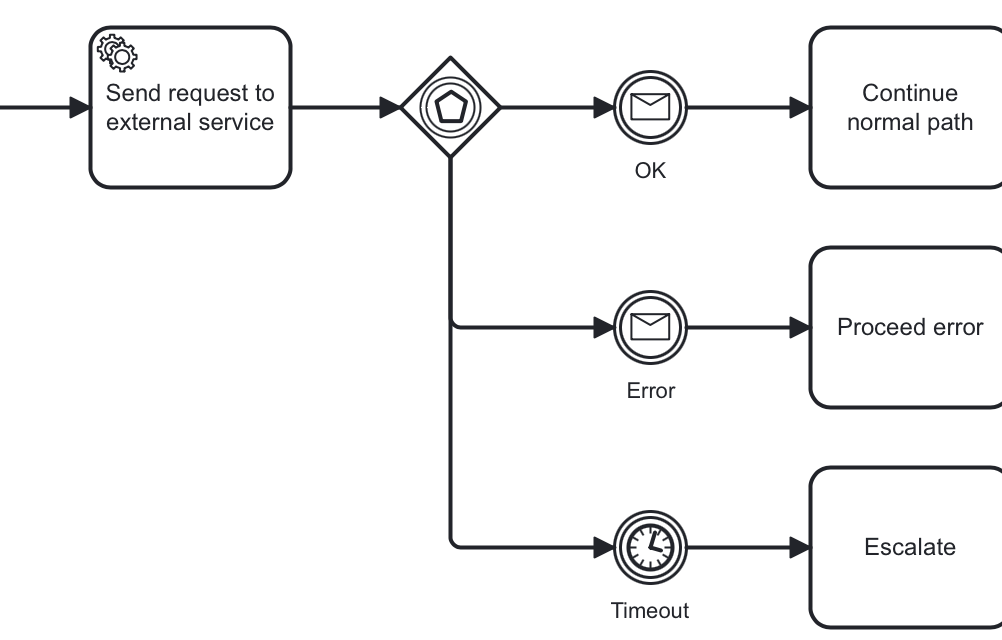
In this example, the service task sends a request to service and then the process arrives to event-based gateway, which is a wait state.
We have three options here:
-
Success — OK message received and the process continues its normal path
-
Failure — Error message received and here you can proceed it; If needed, you can use different messages for errors.
-
Timeout — Time expired, and you have to decide what to do; probably, repeat request attempt.
This pattern makes a diagram more clear and better understandable.