List Component Actions
List component actions work with collections of entities that are displayed in dataGrid or treeDataGrid. These components implement the ListDataComponent interface.
When a list action is added to a dataGrid or treeDataGrid, it can be invoked from the component’s context menu. Usually, actions are also invoked by associated buttons.
For example:
<hbox classNames="buttons-panel">
    <button action="departmentsTable.create"/>
    <button action="departmentsTable.edit"/>
    <button action="departmentsTable.remove"/>
</hbox>
<dataGrid id="departmentsTable" dataContainer="departmentsDc">
    <actions>
        <action id="create" type="list_create"
                actionVariant="SUCCESS" icon="PLUS_CIRCLE"/>
        <action id="edit" type="list_edit"/>
        <action id="remove" type="list_remove"/>
    </actions>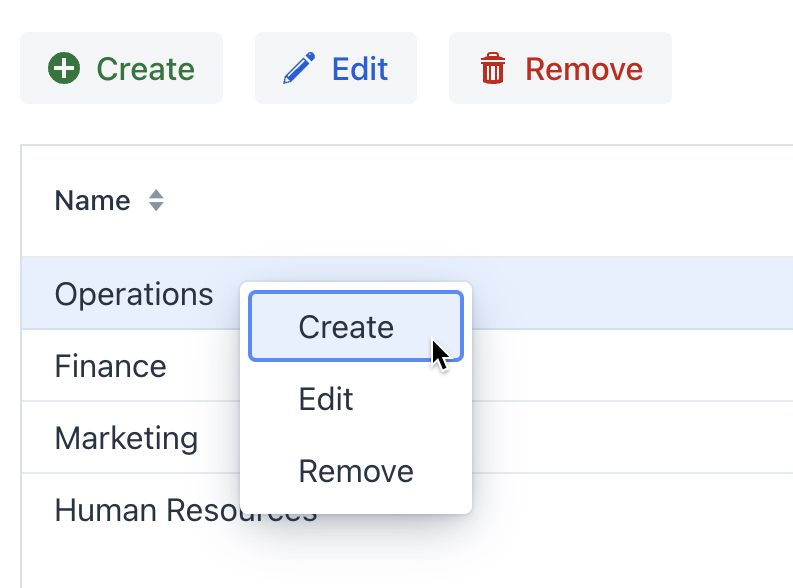
Below are the standard list action types.
list_add
Action class: AddAction
Adds existing entity instances to a data container by looking them up in a list view. Can be used to fill a many-to-many collection.
list_exclude
Action class: ExcludeAction
Removes entity instances from a data container. Unlike list_remove action, list_exclude does not remove the selected instance from the data store. It is required, for example, when working with a many-to-many collection.
list_read
Action class: ReadAction
Shows the selected entity instance in its read view. The read view is chosen by convention.
If the entity has no read view, the action opens the entity detail view in the same way as list_edit action, but makes all fields non-editable and disables save actions. If you want to allow users to switch the detail view to the editable mode, add the detail_enableEditing action to the view.
list_refresh
Action class: RefreshAction
Reloads the data container used by the list component (dataGrid, etc.).
list_remove
Action class: RemoveAction
Removes entity instances from the data container in UI and from the data store.