Transactions
The process engine executes processes in a transactional manner.
It means when you trigger an action such as starting a process, completing a task, or signaling an execution, the engine advances through the process until it encounters wait states on all active execution paths. In more concrete terms, the engine performs a depth-first search through the process graph and will return once it has reached wait states on every branch of execution. This is illustrated in the following picture:
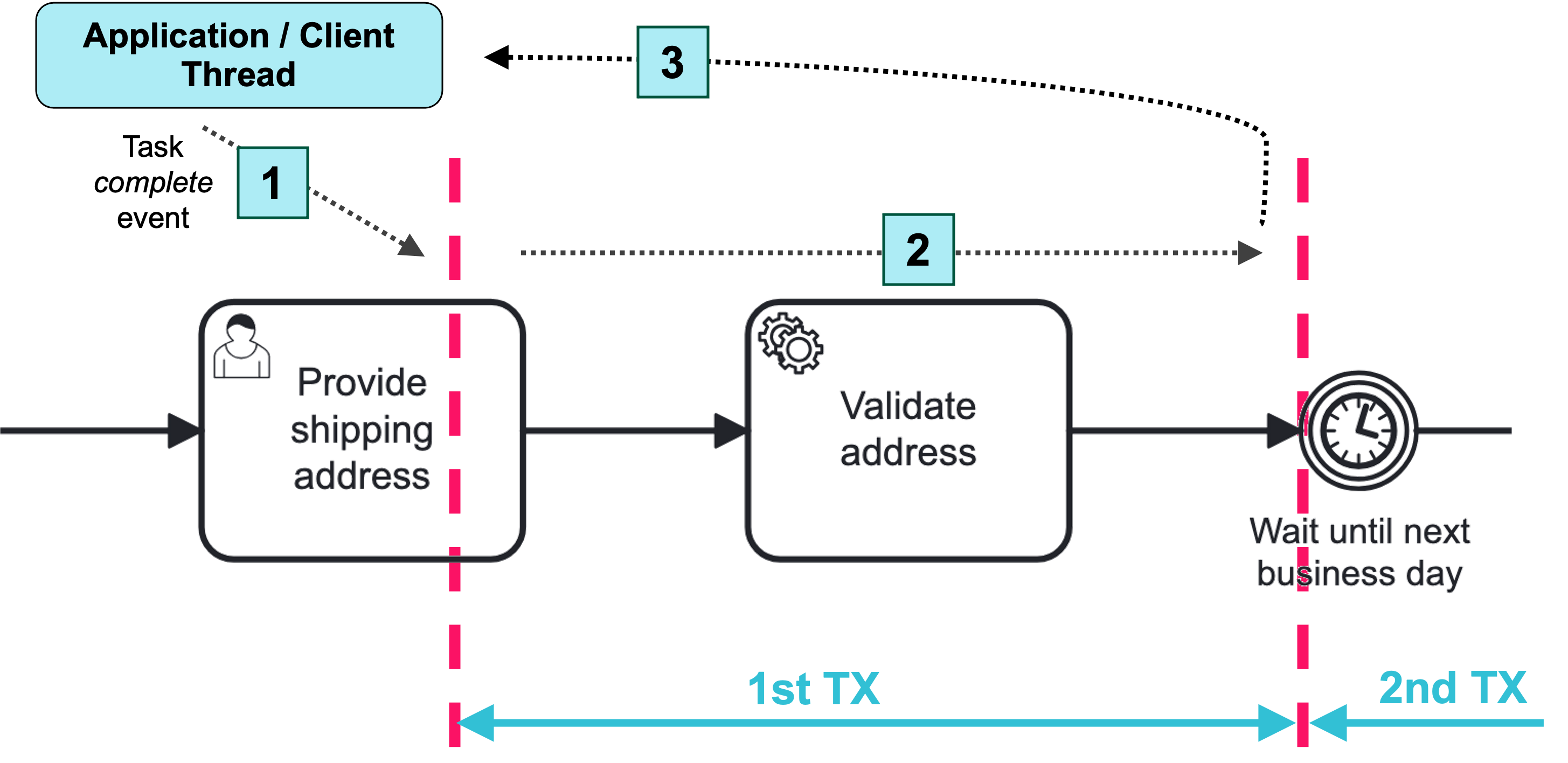
We see a segment of a BPMN process with a user task, a service task and a timer event. Completing the user task and validating the address is part of the same unit of work, so it should succeed or fail atomically.
That means that if the service task throws an exception, we have to roll back the current transaction, such that the execution tracks back to the user task and the user task is still present in the database.
In (1) an application or client thread completes the task. In that same thread, process engine is now executing the service and advances until it reaches a wait state, in this case, timer event (2). Then it returns the control to caller (3), committing the transaction.
Wait States
In BPMN, a wait state refers to a point in the process where the execution is paused, and the process is waiting for an event or a trigger to continue. This state can occur due to various reasons, such as waiting for a message, a timer event, or user input.
Wait states in a process are:
-
User task
-
Timer event
-
Message catch event
-
Signal catch event
-
Service task with external worker
-
Event-based gateway
Asynchronous Continuation
Sometimes we need custom control over transaction boundaries in a process, in order to be able to scope logical units of work. This is where asynchronous continuations come into play. Consider the following process (fragment):
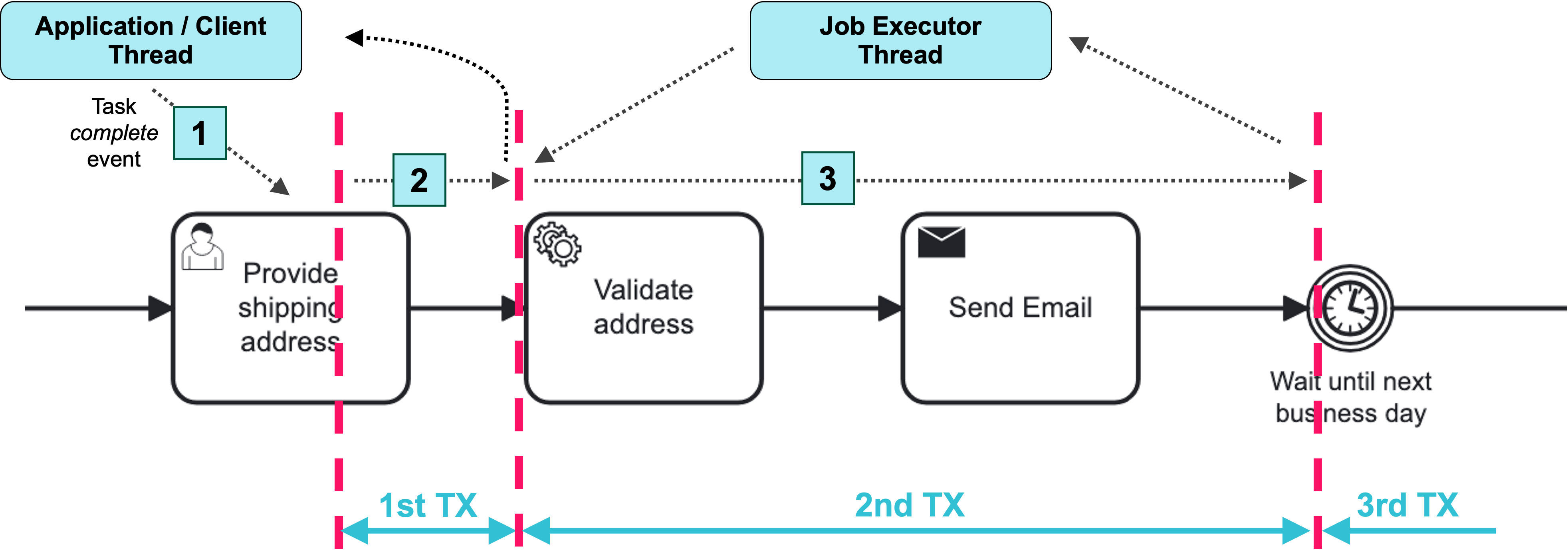
In the next case, we are completing the user task, generating an invoice and then sending that invoice to the customer. This time the generation of the invoice is not part of the same unit of work, so we do not want to roll back the completion of the user task if generating an invoice fails. What we want process engine to do is complete user task (1), commit the transaction and return the control to the calling application.
Then we want to generate the invoice asynchronously, in a background thread. The process engine stores a job for the "generate invoice" task in the database, and the job executor executes it after the transaction commits.
To use this feature, set the flowable:async attribute of the element.
In the modeler, select the Asynchronous checkbox in the element properties, for example, of a service task.
For details, see Asynchronous Continuations in the Flowable documentation.
Asynchronous Execution Properties
The process engine supports the following attributes for activities, gateways, and events. In the modeler, you can set them in the Asynchronous execution section of the element properties:
-
Asynchronous (
flowable:async) — the process engine commits the current transaction before the element. Then the job executor executes the element and continues the process in a new transaction. -
Exclusive (
flowable:exclusive) — the job created for Asynchronous is exclusive: the job executor doesn’t execute it concurrently with other exclusive jobs of the same process instance. Selected by default. Enabled only when Asynchronous is selected. -
Asynchronous leave (
flowable:asyncLeave) — the element is executed in the current transaction. The process engine commits the transaction before leaving the element. Then the job executor completes the element and continues the process in a new transaction. -
Asynchronous leave exclusive (
flowable:asyncLeaveExclusive) — the same as Exclusive, for the job created for Asynchronous leave. Selected by default. Enabled only when Asynchronous leave is selected.
For example, the following service task has both flowable:async and flowable:asyncLeave, so it is executed in its own transaction, separately from the preceding and following parts of the process:
<serviceTask id="generateInvoiceTask" name="Generate invoice"
    flowable:async="true"
    flowable:asyncLeave="true" />
Exclusive Jobs
By default, asynchronous jobs are exclusive: the job executor does not execute exclusive jobs of the same process instance concurrently. Jobs of different process instances are executed concurrently.
To allow the job executor to execute a job concurrently with other jobs of the same process instance, set flowable:exclusive or flowable:asyncLeaveExclusive to false.
For example, the following service task is on one of the parallel paths after a parallel gateway:
<serviceTask id="reserveStockTask" name="Reserve stock"
    flowable:async="true"
    flowable:exclusive="false" />
When parallel paths with non-exclusive jobs arrive at the joining gateway at the same time, one of the transactions can fail with an optimistic locking exception, and the job executor retries the failed job. So, make jobs non-exclusive only if the work of the element can be safely repeated. For details, see Exclusive Jobs in the Flowable documentation.