Drafts Facet
The drafts facet saves unsaved changes of a view as a draft and offers to restore the draft when the user opens the view again. See How It Works for an overview.
Adding the Facet
Declare the add-on namespace in the view descriptor:
<view xmlns="http://jmix.io/schema/flowui/view"
      xmlns:uirec="http://jmix.io/schema/uirecovery/ui"
      title="msg://OrderDetailView.title"
      focusComponent="form">
Then add the uirec:drafts element to the facets element:
<facets>
    <dataLoadCoordinator auto="true"/>
    <uirec:drafts id="draftsFacet"/>
</facets>
In Jmix Studio, you can add the facet from the Facets section of the component palette.
The facet works in any view that has a DataContext and saves the changes registered in it. In a detail view, the draft belongs to the edited record. In other views, for example in a list view with an editable data grid, the view has one draft.
|
You can view and edit facet attributes in Jmix Studio using the Jmix UI inspector panel. |
Attributes
You can change the behavior of the facet in a particular view with the following attributes:
<facets>
    <dataLoadCoordinator auto="true"/>
    <uirec:drafts id="draftsFacet" restoreMode="AUTO" minSaveInterval="10s"/>
</facets>minSaveInterval-
The minimum time between two saves of the draft of the view, for example
5sor1m. Changes made during this time are saved when the interval ends. The default value is set by the jmix.uirecovery.drafts.default-min-save-interval property.
restoreMode-
How a draft is restored when the view is opened:
ASKorAUTO. See Restore Modes. The default value is set by the jmix.uirecovery.drafts.default-restore-mode property.
Saving and Deleting Drafts
The facet saves a draft after the user changes data in the view, but not more often than minSaveInterval allows. When the view is detached, for example because the user closed the browser tab, the facet saves the remaining changes at once.
The facet deletes the draft when:
-
The user saves the changes.
-
The user closes the view and confirms that the changes should be discarded.
If saving a draft fails, the error is written to the log and the view keeps working.
Saving Typed Values
By default, a text field sends its value to the server when the field loses focus or the user presses Enter. Until then, the typed value is not in the data model and cannot be saved in a draft. If the user types a long text into a single field, a failure can lose all of it.
To send the value while the user types, set the valueChangeMode attribute of the field to LAZY or TIMEOUT:
<textArea id="commentField" property="comment" height="9.5em"
          valueChangeMode="LAZY" valueChangeTimeout="1000"/>
In this example, the text area sends its value when the user stops typing for one second. The value is then saved in the next draft. Each sent value is a request to the server, so use this setting for fields where users type a lot of text.
Restore Modes
When the view is opened and a draft is found for it, the facet restores the draft according to the restore mode.
ASK
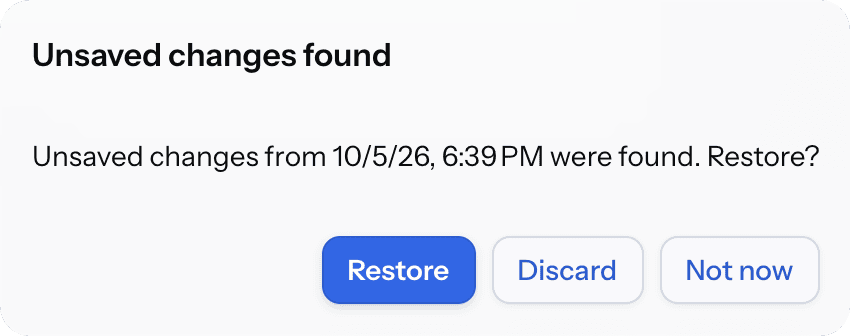
This is the default mode. The facet shows a dialog with the date of the draft:
-
Restore puts the changes from the draft into the view. The changes are not saved to the database until the user saves the view.
-
Discard deletes the draft.
-
Not now closes the dialog and keeps the draft. The dialog is shown again the next time the user opens the view.
If the record was changed by another user after the draft was saved, the dialog warns that restoring the draft will overwrite those changes:
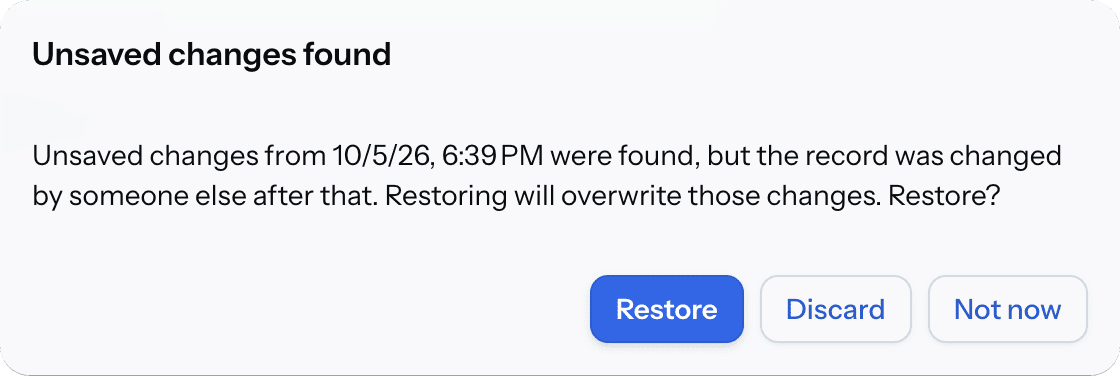
The warning is shown for entities with optimistic locking, that is entities with a version attribute.
What Is Restored
The facet restores only the attributes that the user changed. Other attributes keep their current values.
The facet skips the parts of a draft that can no longer be applied and restores the rest. For example, it skips:
-
An attribute that was removed from the entity in a new version of the application.
-
A record that was deleted after the draft was saved.
If the draft cannot be read at all, the facet deletes it and the view opens without restoring anything. The user is not notified. Details are written to the log.
Custom Restore Logic
To decide in code whether and how a draft is restored, set a restore delegate. The facet calls it before the standard restore. The delegate receives a DraftRestoreContext object with the found draft and the view. If the delegate calls preventRestore(), the facet does not restore the draft and does not show the dialog.
In the following example, the view does not offer drafts older than one day and deletes them:
@ViewComponent
private DraftsFacet draftsFacet;

@Autowired
private TimeSource timeSource;

@Install(to = "draftsFacet", subject = "restoreDelegate")
private void draftsFacetRestoreDelegate(final DraftRestoreContext context) {
    OffsetDateTime draftDate = context.getDraft().getCreatedDate();
    OffsetDateTime minDate = timeSource.now().toOffsetDateTime().minus(Duration.ofDays(1));
    if (draftDate.isBefore(minDate)) {
        context.preventRestore(); (1)
        draftsFacet.deleteDrafts(); (2)
    }
}| 1 | The facet doesn’t restore the draft and doesn’t show the dialog. |
| 2 | Deletes the draft of the current view and record. |
DraftRestoredEvent
The facet sends DraftRestoredEvent after it restores a draft. The event is sent in both restore modes. At this moment, the restored values are in the view, so you can update the UI or check the data. Changes that you make in the event handler are saved in the next draft.
The getDraft() method of the event returns the restored draft, and getRestoredEntities() returns the entity instances that were changed by restoring.
The event is not sent if the user discarded the draft or postponed the decision, if the restore delegate prevented the restore, or if nothing from the draft could be restored.
In the following example, the view validates the restored values and shows the validation errors:
@ViewComponent
private JmixFormLayout form;

@Autowired
private ViewValidation viewValidation;

@Subscribe("draftsFacet")
public void onDraftRestored(final DraftsFacet.DraftRestoredEvent event) {
    ValidationErrors errors = viewValidation.validateUiComponents(form);
    if (!errors.isEmpty()) {
        viewValidation.showValidationErrors(errors);
    }
}
Methods
The DraftsFacet interface has the following methods:
-
saveDraftNow()saves the draft immediately, without waiting for the minSaveInterval. -
deleteDrafts()deletes the draft of the current view and record. -
setMinSaveInterval()andsetRestoreMode()change the values of the attributes. -
setRestoreDelegate()sets the restore delegate. -
addDraftRestoredListener()adds a DraftRestoredEvent listener.