What’s New
This section covers new features of Jmix framework and Studio 2.8, as well as some breaking changes to be aware of when upgrading from a previous version of the framework.
How To Upgrade
|
To create new projects with Jmix 2.8 or to upgrade an existing project, you need Studio 2.8 or later, so update your Jmix Studio plugin first. The minimal supported IntelliJ IDEA version is now 2025.3. |
See Upgrading Project section for how to upgrade your project using Studio. The automatic migration procedure makes the following changes in your project:
-
Updates the version of Jmix BOM which in turn defines versions of all dependencies.
-
Updates the version of Jmix Gradle plugin.
-
Updates Gradle wrapper to 8.14.4
See also the full list of breaking changes that can affect your project after the upgrade.
New Features and Improvements
Studio Improvements
Additional Message Bundles
If you define additional message bundles in your project, Studio now allows you to select a bundle when editing a message in the Localized Message dialog.
Environment Variables in .env Files
Studio now supports using .env files to externalize configuration. You can store environment-specific variables separately from application.properties and use them with placeholders like ${DB_URL}.
See the External Configuration with .env Files section for details.
Ignoring Foreign Key Constraint
Studio now respects JPA constraint modes when generating changelogs for associations. When you set ConstraintMode.NO_CONSTRAINT in @JoinColumn, the generated changelog does not include the foreign key constraint. See Ignoring Foreign Key Constraints for details.
SAML Add-on
The Jmix SAML add-on enables SAML 2.0 authentication in Jmix applications. With this add-on, a Jmix application can act as a service provider (SP) and rely on an external identity provider (IdP), such as Keycloak, Okta, Microsoft Entra ID, and others, to authenticate users.
Setup and configuration details will be available soon in the SAML add-on section.
Day Marks in Business Calendar
Previously, the Business Calendars add-on only allowed adding descriptions to holidays. Now you can add a mark to any calendar entry. This makes it easier to categorize days and indicate why a date may have different working hours. New API methods are available to retrieve information about a specified day, including its assigned mark.
See Creating Business Calendar for details.
Process Drafts View
The BPM add-on now provides a dedicated view to browse and preview process drafts. Previously, drafts were only accessible through the dialog in the Modeler view and could not be previewed.
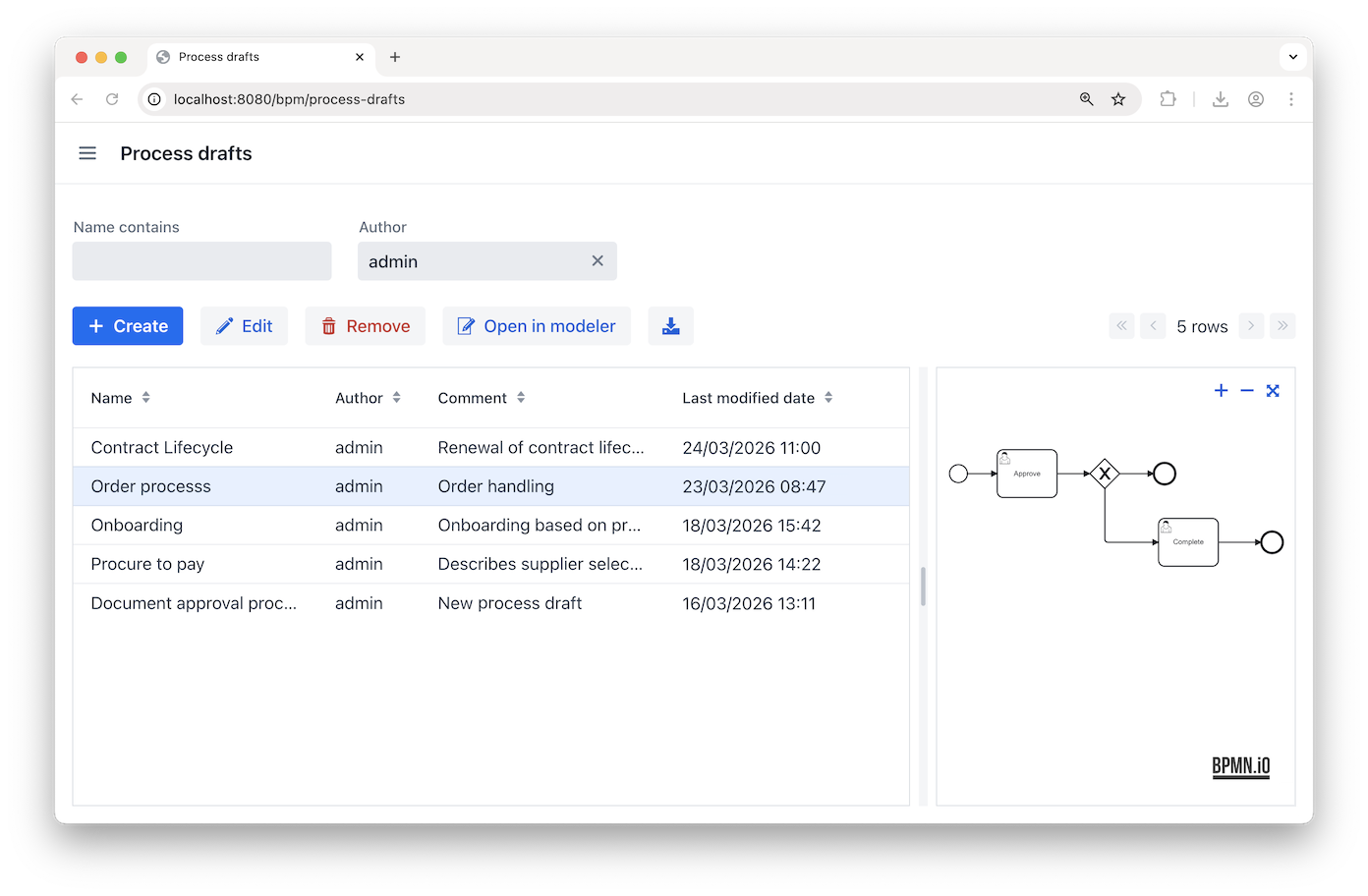
See Process Drafts for details.
Highlighting Executed Path in Process Instance Diagrams
The BPM add-on enhances process instance diagrams to highlight completed activities in green, making the executed path easy to follow.
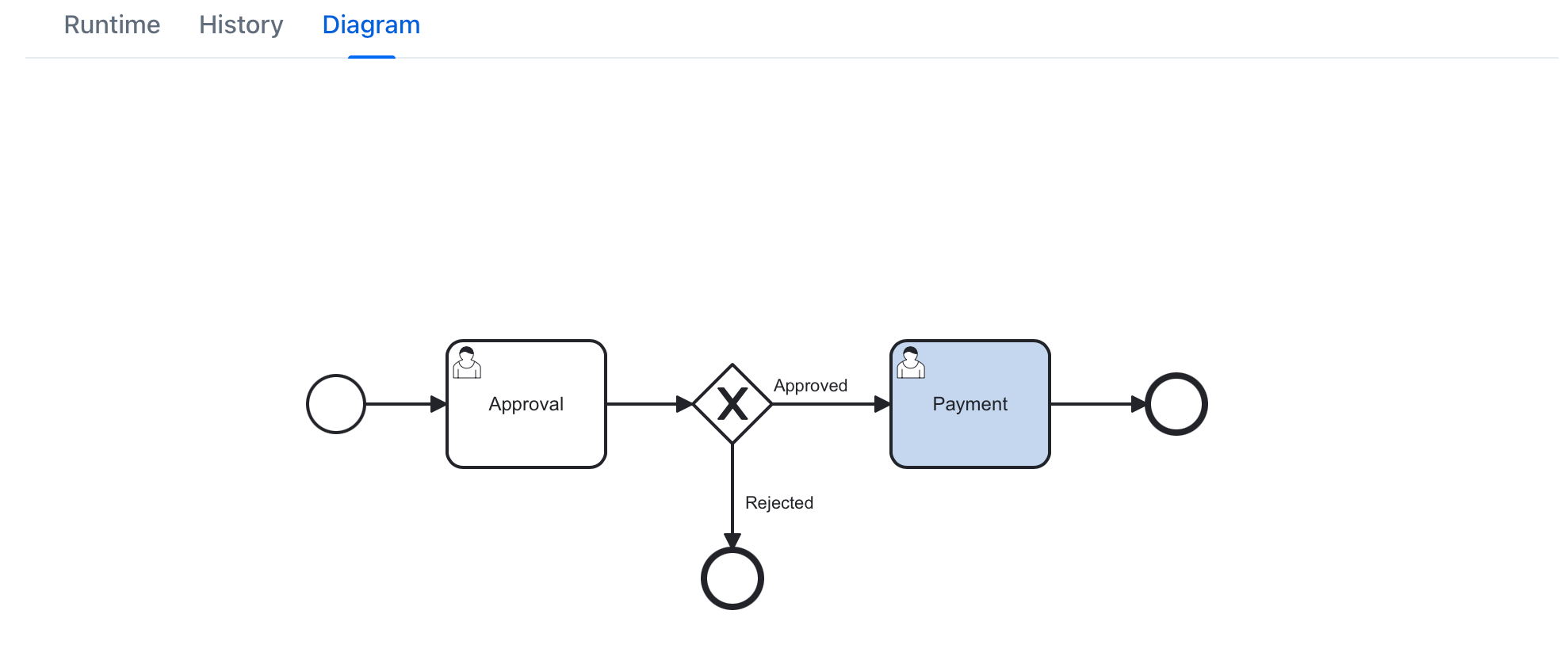
The diagram is available on the Process Instances view.
Dynamic Attributes in Process Forms
In the BPM add-on, dynamic attributes can now be loaded and displayed in process forms based on Jmix views. You can enable this behavior with the @ProcessVariableParam annotation. See Loading Dynamic Attributes for details.
Data Model Visualization
The Data Tools add-on now includes a Data Model view to show entities and their attributes in the running application. Additionally, the view lets you create a data model diagram (for all entities or a chosen subset) using a public or self-hosted PlantUML server.
Support for Element Collections
The Jmix data model now supports collections of basic types, FileRef objects or custom types. In JPA entities, these collection attributes are annotated with @ElementCollection and stored in separate database tables.
See the Entities section for how to define element collections and Using DataManager for how to use them in queries.
Element collection attributes are lazily loaded by default and can be included in fetch plans when needed.
Element collection attributes can be used in the genericFilter component conditions and can be bound as values of multiValuePicker, multiSelectComboBox and multiSelectComboBoxPicker components.
To create an element collection attribute in Studio, select ELEMENT_COLLECTION in the Attribute type dropdown of the New Attribute dialog.
See also #1271.
Facets in Fragments
Fragments now support facets. See Facets in Fragments for how to use them and the information on the related breaking changes below:
Side Panel Layout
The new sidePanelLayout component provides a declarative way to build layouts with a collapsible side panel. It allows displaying contextual content or actions without navigating away from the current view.
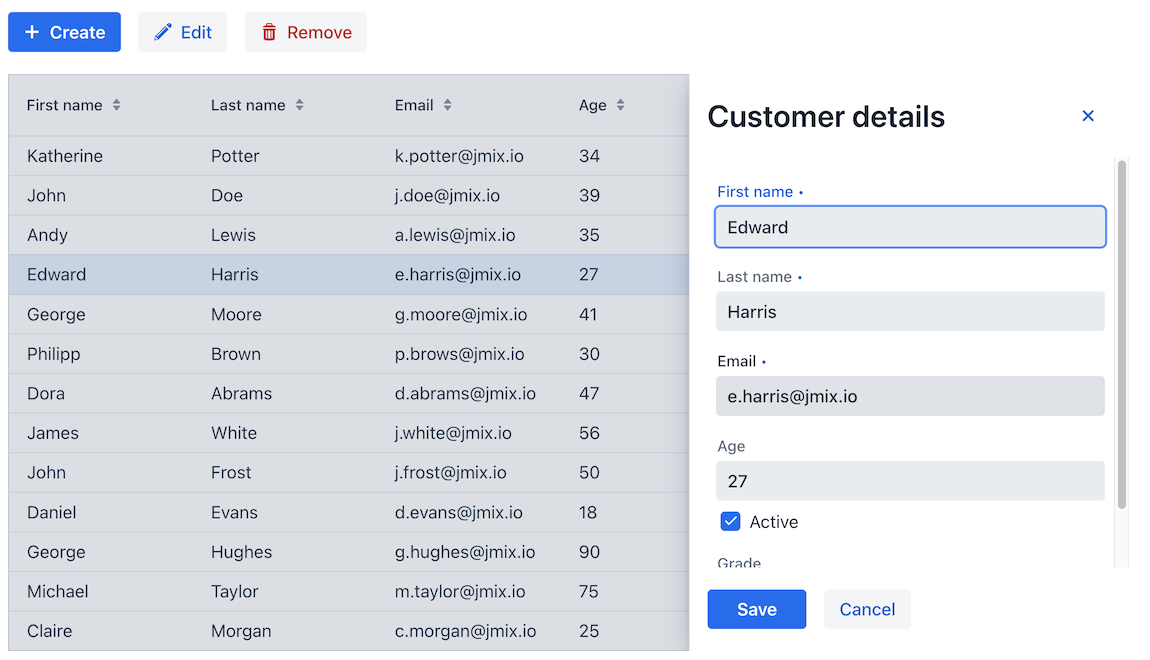
The side panel can open from different sides and can either overlay the main content or push it aside. See sidePanelLayout for details and usage examples.
Side Dialog
The Dialogs API introduces side dialogs – a UI pattern similar to sidePanelLayout, but implemented programmatically. SideDialog creates an overlay attached to the side of the screen.
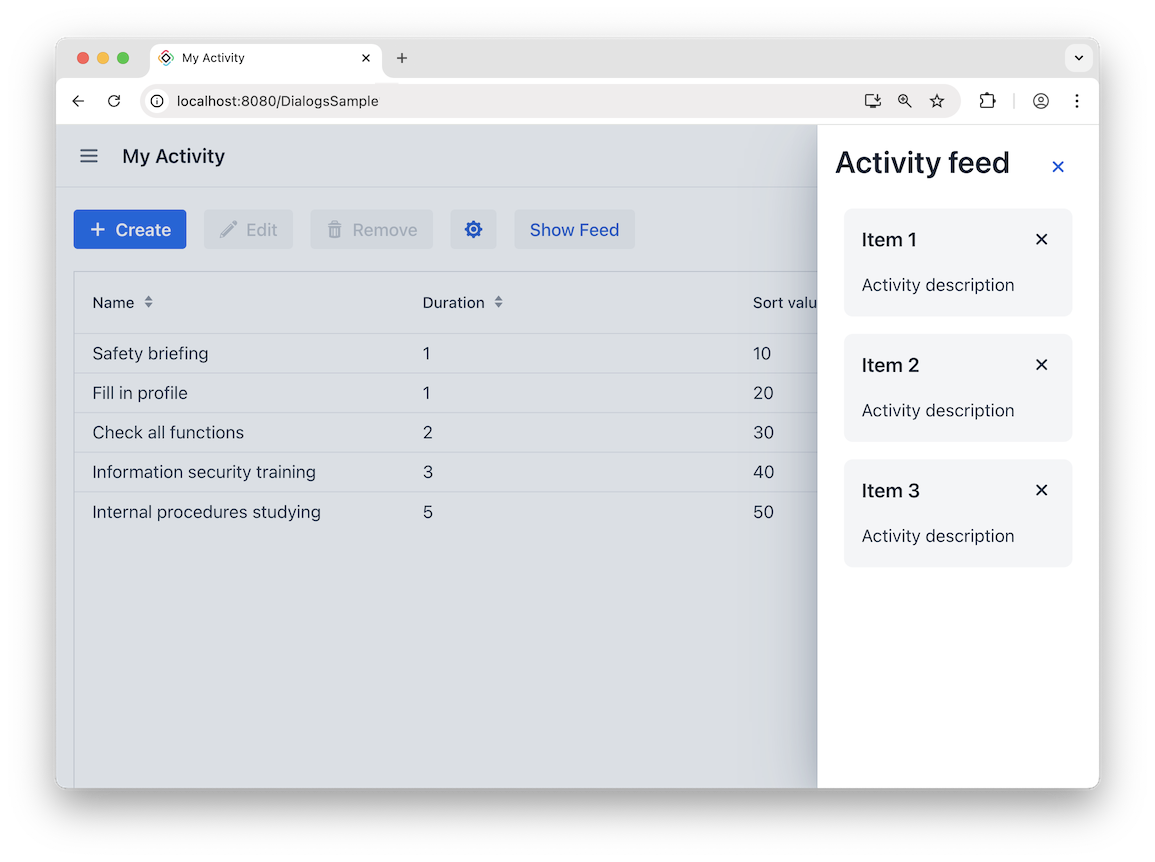
Use it for temporary interactions that should not be embedded directly into the view layout. See SideDialog for details and usage example.
Support for Custom Icons in Components
Multiple components now support custom icons through nested elements. These elements represent specific icon slots in a component — for example <icon>, <uploadIcon>, or <dropdownIcon> and allow you to provide your own icon. You can supply icons as SVGs, font icons, or images.
For example:
<button text="Download">
    <icon>
        <fontIcon fontFamily="lumo-icons" charCode="ea17"/>
    </icon>
</button>
List of components: action, button, dropdownButton,comboButton, drawerToggle, fileUploadField, fileStorageUploadField, upload, notificationsIndicator, webdavDocumentUpload, menu.xml (both <menu> and <item> support <icon>).
See the Icons section for details.
Ability to Override Default Icons
You can now override icons across your entire application. The new JmixFontIcon enum combines Vaadin, Lumo (not present in Vaadin), and Jmix-specific icons into a single, consistent set. The Icons bean provides a central way to create UI components representing icons. Change icons by redefining CSS variables or by swapping the icon font.
See Overriding Default Icons for details.
Tracing
Jmix now uses Micrometer Observation API to create spans for framework operations, such as data access, UI view and fragment lifecycle, UI actions. Jmix can also enrich observations with the current user and tenant context.
See Observability: Tracing for details.
Support for H2 Database (Experimental)
Added experimental support for the H2 database. You can now select H2 File or H2 Server in the Database type dropdown of the data store properties editor.
Add spring.h2.console.enabled=true application property to enable the web-based database console in development environment. The console will be available at http://localhost:8080/h2-console.
Custom Update Services (Experimental)
The Generic REST API, Entity Inspector and BPM Entity Data Task now can delegate save and remove operations to a custom application service instead of calling the DataManager directly. It allows you to place your entity update logic in a service and be sure that it will be invoked from the generic functions of the framework. Previously you had to use EntityChangedEvent listeners for this.
The following interfaces should be implemented by your custom service to be called by the framework:
public interface SaveDelegate<E> {

    /**
     * Called by generic framework mechanisms instead of {@code DataManager} when saving entities of type {@code E}.
     *
     * @param entity entity to save
     * @param saveContext the whole save context
     * @return saved entity
     */
    E save(E entity, SaveContext saveContext);
}

public interface RemoveDelegate<E> {
    /**
     * Called by generic framework mechanisms instead of {@code DataManager} when removing entities of type {@code E}.
     *
     * @param entity entity to remove
     */
    void remove(E entity);
}
Breaking Changes
Facet Registration and Loading Mechanism
The FacetProvider mechanism for facet registration is now deprecated and will be removed in a future version. Existing custom facets registered with FacetProvider continue to work due to backward compatibility. However, migration to the new FacetRegistrationBuilder API is strongly recommended. See Custom Facets.
A breaking change affects standard Jmix facet overrides. If you previously overrode framework facets using the old mechanism, these overrides will no longer work after upgrading. Such custom implementations must be redefined using the new API:
@Configuration
public class FacetConfiguration {

    @Bean
    public FacetRegistration extTimerFacet() {
        return FacetRegistrationBuilder.create(MyOverridenFacet.class)
                .replaceFacet(OriginalFacet.class)
                .build();
    }
}
Facet API Changes
This release introduces several improvements to the facet API to better support fragments and provide cleaner abstractions.
Facet Owner Type Changes
The Facet.getOwner() and Facet.setOwner() methods have been updated to support fragment owners:
-
Facet.getOwner()now returns<T extends Composite<?> & FacetOwner> T(previouslyView<?>) -
Facet.setOwner()signature changed to<T extends Composite<?> & FacetOwner> void setOwner(@Nullable T owner)(previously voidsetOwner(@Nullable View<?> owner))
Previously, a facet owner could only be a View. Now any component implementing both Composite<?> and FacetOwner can serve as a facet owner. This change enables facets to work with fragments, as Fragment implements both interfaces.
If your code directly calls these methods, update the types accordingly.
Facet Class Refactoring
Concrete implementation classes (*Impl) have been replaced with abstract base classes:
-
DataLoadCoordinatorImpl→AbstractDataLoadCoordinator -
SettingsFacetImpl→AbstractSettingsFacet<S extends UiComponentSettings<S>>
If you previously instantiated these classes directly, migrate to using dependency injection or the new abstract classes.
Settings Interface Parameterization
The settings interfaces are now parameterized to improve type safety:
-
SettingsFacet→SettingsFacet<S extends UiComponentSettings<S>> -
SettingsContext→SettingsContext<S extends UiComponentSettings<S>>
If you implement a custom SettingsFacet or use SettingsContext, add the generic parameter:
// Before:
public class MySettingsFacet implements SettingsFacet

// After:
public class MySettingsFacet implements SettingsFacet<MyUiComponentSettings>
For more details, see the corresponding issue: #4185.
Deprecated getIcon() methods that return Icon
This release adds the Icons bean to support overriding default icons. When resolving XML icon attributes, the bean treats values without a collection name as font icons and produces a FontIcon; values that include a collection name produce an Icon. For example:
-
icon="CHECK"creates aFontIconcomponent, -
icon="vaadin:check"creates anIconcomponent.
Because of this, components with a getIcon() method that returns an Icon are deprecated. If you declare the icon without a collection name such methods will return null. Use getIconComponent() to obtain the actual icon component in all cases.
View Routes
Routes of all views provided by the Jmix subsystems are changed to kebab-case. For example: sec/resourcerolemodels → sec/resource-role-models. For backward compatibility, old routes are defined as aliases, so all saved external links should work.
If you have overridden a framework view and copied the @Route annotation to your view class, remove it. Otherwise, the view will fail to register and the application won’t start.
See #4841 for more information.
Role Scopes in OIDC and Authorization Server
Fixed handling of role scopes in OpenID Connect add-on. You can use jmix.oidc.filter-chain.force-ui-scope-enabled and jmix.oidc.filter-chain.force-api-scope-enabled application properties to revert to the previous behavior.
If you have used the jmix.resource-server.force-api-security-scope.enabled property in Jmix 2.7, replace it with the jmix.authserver.filter-chain.force-api-scope-enabled property set to false.
See #5094 for more information.
MariaDB UUID
For compatibility with all previous and current versions of MariaDB and Liquibase, char(36) is now explicitly used for UUID attributes.
If you are using MariaDB, follow the instructions below after updating your project to Jmix 2.8.
-
Eliminate Liquibase checksum errors for executed changelogs. You can do it using one of two options:
-
Run your application once with
main.liquibase.clear-checksums=trueproperty. For example, if your main data store uses MariaDB, execute the following command:./gradlew bootRun --args='--main.liquibase.clear-checksums=true'Alternatively, you can add
main.liquibase.clear-checksums=trueto yourapplication.propertiesfile and build a special version of your application to run once against your production database.After running Liquibase on your database with this option, the checksums in the database will be updated and compatible with the changelogs located in your source code.
Do not use
main.liquibase.clear-checksums=truefor subsequent launches. -
Instead of clearing checksums, you can set valid values in the changelog files. For each changeset that uses the
uuid.typevariable, setvalidCheckSumto the value currently present in theMD5SUMcolumn of theDATABASECHANGELOGtable. For example:<changeSet id="1" author="admin"> <validCheckSum>9:c2f20bd9d8765d4c2554826e5eb376a8</validCheckSum> <!--...--> </changeSet>
-
-
Make sure the root changelog (e.g.
com/company/sample/liquibase/changelog.xml) includes the following property:<property name="uuid.type" dbms="mariadb" value="char(36)"/> -
Make sure newly generated changelogs use
${uuid.type}orchar(36)forUUIDattributes. For example:<changeSet id="1" author="sample"> <createTable tableName="FOO"> <column name="ID" type="${uuid.type}">
See #4838 for more information.
