sidePanelLayout
A layout component that adds a panel can open from different sides and either overlay the main content or push it aside. Use it for contextual information, filters, or editors that need to appear alongside the primary content.
A side panel can be also created programmatically using Side Dialog.
|
XML Element |
|
|---|---|
Java Class |
|
Attributes |
General: id - modal - closeOnOutsideClick - displayAsOverlayOnSmallDevices - visible |
Position: alignSelf - justifySelf - colspan |
|
Size: sidePanelHorizontalSize - sidePanelHorizontalMinSize - sidePanelHorizontalMaxSize - sidePanelVerticalSize - sidePanelVerticalMinSize - sidePanelVerticalMaxSize - height - width - maxHeight - maxWidth - minHeight - minWidth |
|
Look & Feel: css - sidePanelOverlay - sidePanelPosition |
|
Other: closeOnOutsideClick - displayAsOverlayOnSmallDevices - modal - overlayAriaLabel |
|
Handlers |
AttachEvent - DetachEvent - ModalityCurtainClickEvent - SidePanelBeforeOpenEvent - SidePanelAfterOpenEvent - SidePanelCloseEvent |
Basics
SidePanelLayout divides the content into two areas:
-
Main content – the primary layout area.
-
Side panel content – a panel that slides in from one side.
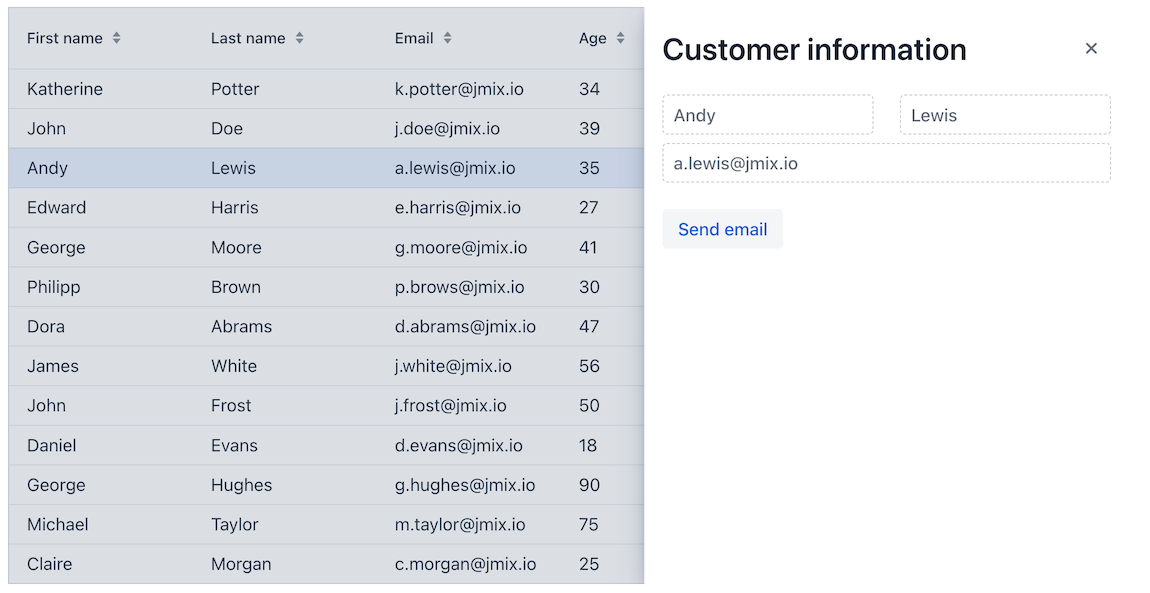
To define the component in XML, use the sidePanelLayout element and provide two root elements.
        <sidePanelLayout id="sidePanelLayout"
                         width="100%"
                         height="100%">

            <vbox id="contentBox">
                <!-- Main content -->
            </vbox>

            <vbox id="sidePanelBox" width="100%" height="100%">

                <hbox id="headerBox" width="100%"> (1)
                    <h2 text="Customer information"/>
                    <sidePanelLayoutCloser/>
                </hbox>

                <!-- Side panel content -->

            </vbox>
</sidePanelLayout>| 1 | A side panel typically includes a close button. Use the dedicated sidePanelLayoutCloser component to add that button. |
Opening the Side Panel
The side panel opens in response to user actions such as clicking a button. Call the toggleSidePanel() method:
    @ViewComponent
    private SidePanelLayout sidePanelLayout;

    @Subscribe(id = "toggleButton", subject = "clickListener")
    public void onToggleButtonClick(final ClickEvent<JmixButton> event) {
        sidePanelLayout.toggleSidePanel();
    }
Side Panel Editor
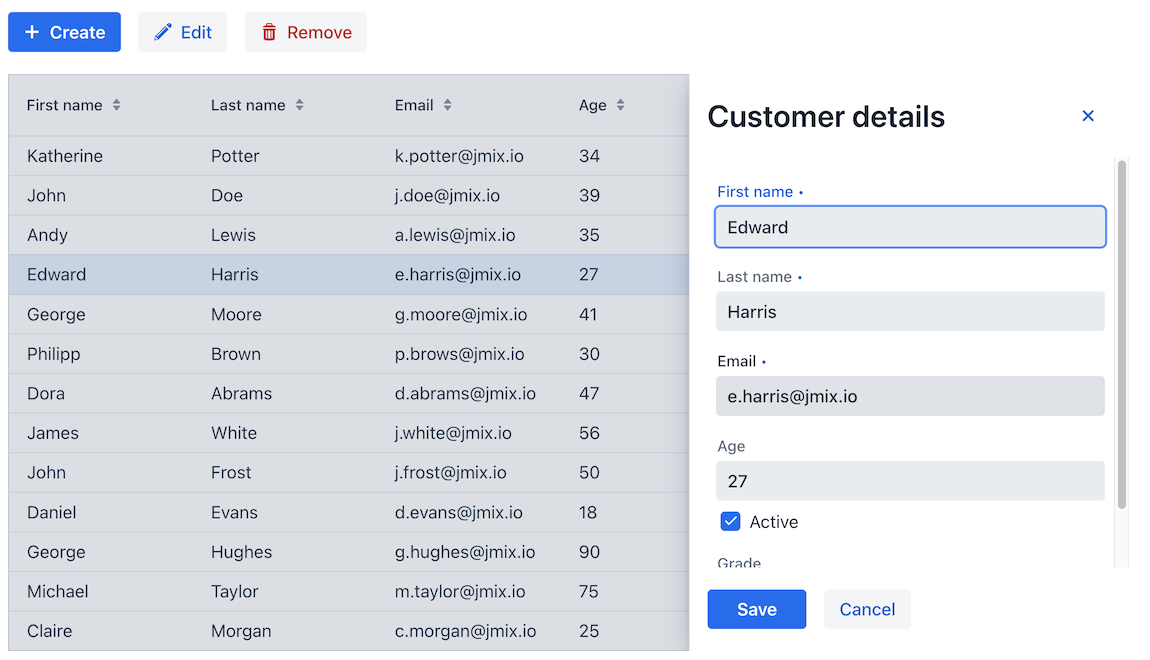
Use SidePanelLayout for master-detail pattern where the main area contains a list of entities and the side panel is used for editing a selected instance.
Styling
You can customize the appearance and size of SidePanelLayout using CSS variables and theme selectors.
Sizing with CSS Variables
The following variables define the side panel size. They are applied globally to all SidePanelLayout instances.
| Values set in XML or using the Java API override CSS variables. |
Horizontal side panels (LEFT, RIGHT, INLINE_START, INLINE_END):
Variable |
Description |
Default |
|---|---|---|
|
Preferred width of the side panel. |
|
|
Maximum width. |
|
|
Minimum width. |
|
Vertical side panels (TOP, BOTTOM):
Variable |
Description |
Default |
|---|---|---|
|
Preferred height of the side panel. |
|
|
Maximum height. |
|
|
Minimum height. |
|
Appearance
Variable |
Description |
Default |
|---|---|---|
|
Controls how long the open and close animation takes. |
|
Parts
SidePanelLayout exposes the following stylable parts:
Part |
Description |
|---|---|
|
Container for content, side panel, and modality curtain. |
|
Main layout content. |
|
Modality curtain. |
|
Side panel content container. |
States
The component exposes the following states:
State |
Description |
|---|---|
|
Applied when the side panel is open |
|
Applied when the side panel is modal |
|
Matches the current side panel position ( |
|
Applied when the panel overlays content instead of pushing it |
Attributes
Common attributes serve the same purpose for all components. The following attributes are specific to sidePanelLayout.
Name |
Description |
Default |
|---|---|---|
Defines the side from which the panel appears. Possible values are
|
|
|
Determines how the side panel interacts with the main content. If |
|
|
When |
|
|
When This attribute only has an effect when modal is enabled. |
|
|
Sets the accessible label for the overlay element. |
– |
|
If |
|
|
Defines the horizontal size of the side panel when it is positioned on the left or right side of the layout. The value can be any valid CSS size such as |
|
|
Defines the minimum horizontal size of the side panel when it is positioned on the left or right side. |
– |
|
Defines the maximum horizontal size of the side panel when it is positioned on the left or right side. |
– |
|
Defines the vertical size of the side panel when it appears from the top or bottom. |
|
|
Defines the minimum vertical size of the side panel. |
– |
|
Defines the maximum vertical size of the side panel. |
– |
Handlers
Common handlers are configured in the same way for all components. The following handlers are specific to sidePanelLayout.
Name |
Description |
|---|---|
Fired when the user clicks on the modality curtain. |
|
Fired before the side panel is opened, before it is displayed and before the opening animation starts. Use this event to update the side panel content before it becomes visible. |
|
Fired after the side panel is fully opened and the opening animation is finished. |
|
Fired when the side panel is closed. |
