Facets
Facets are non-visual components that add supplementary behavior to the view or its components.
Built-in Facets
The framework provides the following facets:
To add some facet on the view, use Jmix Studio.
Click Add Component in the actions panel, then select the Facets section, and double-click the selected facet item.
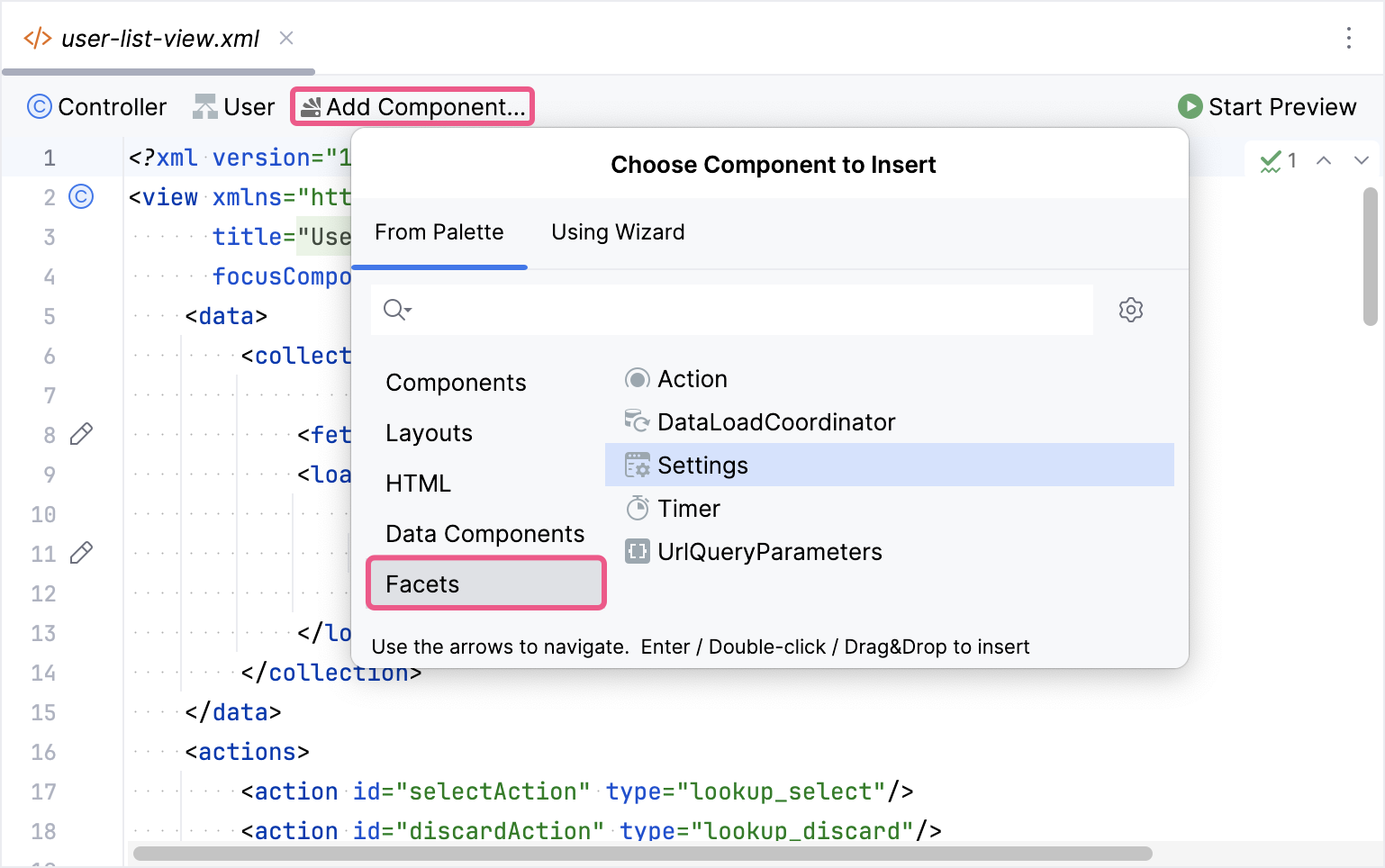
Studio will create the <facets> element:
<facets>
    <settings auto="true"/>
</facets>|
You can view and edit facet attributes in Jmix Studio using the Jmix UI inspector panel. |
Custom Facets
Applications or add-ons can provide their own facets. To create a custom facet, follow the steps below:
-
Create an interface extending
io.jmix.flowui.facet.Facet. -
Create an implementation class based on
io.jmix.flowui.facet.impl.AbstractFacet. -
Register the facet using the new
FacetRegistrationBuilder(see details below). -
Create an XSD schema to use the facet in view XML descriptors.
-
Optionally, create an annotated interface to add support for the facet in the Jmix UI inspector panel of the Studio view designer.
The DataLoadCoordinator and UrlQueryParametersFacet classes of the framework can be good examples of creating a facet.
Registering a Custom Facet
The facet registration mechanism consists of three main components:
-
Implementation - the class that implements the facet logic.
-
Loader - a class that reads the facet configuration from XML and creates the facet instance.
-
Tag - the XML element name used to declare the facet in a view.
You can register new facet combinations using the FacetRegistrationBuilder.
Example of registering a custom timer facet:
import io.jmix.flowui.facet.Timer;
import io.jmix.flowui.sys.registration.FacetRegistration;
import io.jmix.flowui.sys.registration.FacetRegistrationBuilder;
import org.springframework.context.annotation.Bean;
import org.springframework.context.annotation.Configuration;

@Configuration
public class FacetConfiguration {
    @Bean
    public FacetRegistration extTimerFacet() {
        return FacetRegistrationBuilder.create(TimerExtImpl.class) (1)
                .replaceFacet(Timer.class) (2)
                .withFacetLoader("timer", TimerFacetExtLoader.class) (3)
                .build();
    }
}| 1 | Specifies the class that implements the facet. |
| 2 | Is used if your facet should replace an existing framework facet (for example, the standard Timer). This call substitutes all usages of the original facet in views with your custom implementation. |
| 3 | Associates an XML tag (for example, "timer") with a loader class. The loader must extend io.jmix.flowui.xml.facet.loader.FacetLoader and know how to create the facet from XML. |
If your facet does not replace an existing one, you can omit replaceFacet() and simply provide a loader:
@Bean
    public FacetRegistration customTimerFacet() {
        return FacetRegistrationBuilder.create(TimerExtImpl.class)
                .withFacetLoader("customTimer", TimerFacetExtLoader.class)
                .build();
    }